
 | VISUAL STUDIO
 | VISUAL STUDIO
Powerful IDE, made smarter with AI
Agent mode – now available in GitHub Copilot Free
Experience AI-powered coding assistance that reasons through problems, coordinates next steps, applies changes, and iterates on errors.
Get Started with Visual Studio
Contact us for a demo, product resources, and formal quotation.
Start coding
IntelliSense predicts your next move, delivering precise, context-aware suggestions to streamline your coding flow.
Enhance with AI
Build momentum as Copilot delivers seamless assistance to tackle complex tasks and refine your project with ease.
Debug confidently
A best-in-class debugger helps you identify and fix issues early, keeping your code solid before it hits production.
Test seamlessly
Validate your code with integrated testing for fast iterations and higher quality as you approach the finish line.
Deploy with CI/CD
Finish your path to production smoothly with Git and CI/CD managing repositories and automating deployments.

Real AI solutions with agent mode
- Plan, build, test, and fix—all from a single prompt.
- Describe your need in natural language; let Copilot do the rest.
- Run linters, tests, and commands without leaving Visual Studio.

Always up-to-date AI models
- Access the latest AI models to get the most accurate, context-aware suggestions in Chat or inline.
- Select a model to match the needs of each task.

Free and fully integrated in Visual Studio
- AI-powered coding assistance, integrated into Visual Studio.
- Receive 2,000 code completions.
- Get 50 chat messages free per month.
Copilot: your pair programmer
Speed up development with context-aware code completion suggestions for a single line or an entire code snippet. Use Copilot Edits for multi-file editing with code review, in-file preview, and rollback experience.

Chat for assistance with code and queries
Get real-time help for your coding queries with GitHub Copilot Chat. The conversational Chat interface provides instant context aware suggestions, assists with debugging, and generates units tests, all within your development environment.

Debugging made easy with Copilot
Accelerate debugging with deep insights into your code, powered by AI. Copilot offers in-depth analysis and explanations to provide targeted solutions for exceptions, deadlocks, and other debugging scenarios.

Improve testing efficiency through Copilot
Reduce time spent on manual test creation and maintaining code quality. Copilot’s automation helps you improve reliability by identifying errors early with unit and integration tests based on your existing code.

Leverage Copilot to streamline version control
Maintain a clean and organized codebase with AI-generated commit messages based on code changes. GitHub Copilot simplifies your version control by ensuring clarity in your workflow, branch management, and merge conflicts.

Share more than screens
Live Share’s real-time collaboration sessions speed up your team’s edit and debugging cycles, no matter the language or platform. Personalized sessions with access controls and custom editor settings make sure everyone stays code-consistent.

Azure in Visual Studio
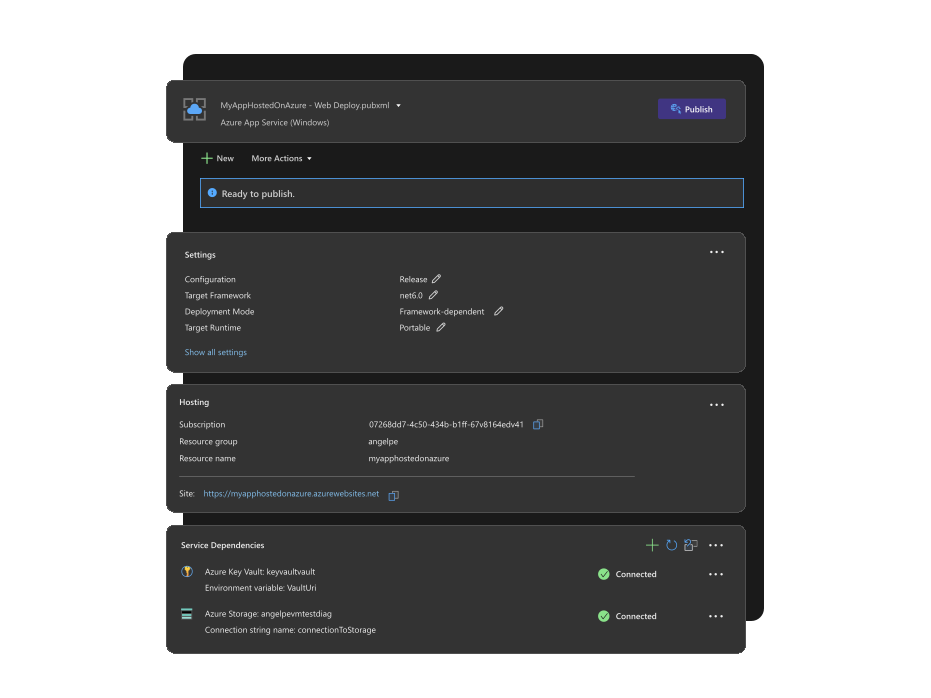
Build, deploy, and scale with Azure in Visual Studio: Create cloud-first applications efficiently and securely using integrated tools and AI capabilities—all within your IDE. Whether developing web apps, APIs, or AI-powered solutions, Visual Studio offers seamless Azure integration for a streamlined coding experience. Explore tutorials, elevate your coding, and automate deployments with Azure DevOps and GitHub Actions. Connect to Azure services, deploy applications, and debug in real-time with Visual Studio’s powerful tools.
Design beautiful cross platform apps
Visual Studio is the best IDE for building modern, cross-platform applications for Windows, Mac, Linux, iOS, and Android. Create rich client apps with WinForms, WPF, WinUI, and MAUI, using powerful visual designers that simplify complex layouts and bring your UI to life.

Build fast and responsive apps with the built-in profiling tools
Use the profiling tools in Visual Studio to build fast and responsive .NET and C++ applications for web and client. With profilers for CPU, memory, XAML, databases, events, and more you have a whole suite of tools that help you identify and resolve performance issues.

Tools to make SQL a breeze
Work with SQL projects without leaving the IDE. Build out queries with rich editing experiences, view and explore servers and databases. Visualize database schemas and queries all from within Visual Studio.

Technologies
C++
Use C++ for speed, performance, and compatibility across a wide range of devices
Node.js
Leverage Node.js for building fast, scalable, cross-platform applications in JavaScript
Python
Leverage Python for cross-platform scripting, web services, IoT, and data science tasks
.NET
Use .NET to create apps and services on any device and OS
JavaScript/TypeScript
Bring productivity, quality, and flexibility to your JavaScript apps
Features
Develop
Navigate, write, and fix your code fast
Debug
Debug, profile, and diagnose with ease
Test
Write high-quality code with comprehensive testing tools
Collaborate
Use version control, be agile, collaborate efficiently
Extend
Choose from thousands of extensions to customize your IDE
Solutions
Windows
Develop apps and games to reach every device running Windows
Mobile Apps
Create native or hybrid apps targeting Android, iOS, and Windows
Azure Apps
Build, manage, and deploy cloud scale apps to Azure with ease
Web Apps
Develop modern web apps with flexibility and powerful open tools
Office
Utilize powerful tools for all types of Office development
Games
Design, code, and debug games with cutting-edge graphics and scripting tools
Extensions
Write your own extensions for Visual Studio
Database
Develop and deploy SQL Server and Azure SQL databases with ease
Compare Visual Studio editions
Community · Professional · Enterprise
| Feature/capability | Visual Studio Community | Visual Studio Professional | Visual Studio Enterprise |
|---|---|---|---|
| Supported usage | |||
| Individual developers | ✔ | ✔ | ✔ |
| Classroom learning | ✔ | ✔ | ✔ |
| Academic research | ✔ | ✔ | ✔ |
| Open source contribution | ✔ | ✔ | ✔ |
| Non‑enterprise, up to 5 users | ✔ | ✔ | — |
| Enterprise | — | — | ✔ |
| Development platform support | |||
| Windows desktop, UWP, Web (ASP.NET), Office 365, Azure Stack, C++ cross‑platform, Python, Node.js, .NET Core, Docker tools | ✔ | ✔ | ✔ |
| Integrated development environment | |||
| Real‑time dependency validation | ✔ | ✔ | ✔ |
| Architecture layer diagrams | ✔ | ✔ | ✔ |
| Architecture validation | ✔ | ✔ | ✔ |
| Code clones | ✔ | ✔ | ✔ |
| CodeLens | ✔ | ✔ | ✔ |
| Peek definition | ✔ | ✔ | ✔ |
| Refactoring | ✔ | ✔ | ✔ |
| One‑click web deployment | ✔ | ✔ | ✔ |
| Model resource viewer | ✔ | ✔ | ✔ |
| Solution visualization with code maps & dependency graphs | read‑only | read‑only | ✔ |
| Multi‑targeting | ✔ | ✔ | ✔ |
| Advanced debugging & diagnostics | |||
| IntelliTrace | — | — | ✔ |
| Code map debugger integration | — | — | ✔ |
| .NET memory dump analysis | ✔ | ✔ | ✔ |
| Code metrics | ✔ | ✔ | ✔ |
| Graphics debugging | ✔ | ✔ | ✔ |
| Static code analysis | ✔ | ✔ | ✔ |
| Performance & diagnostics hub incl. layer interaction | ✔ | ✔ | ✔ |
| Snapshot Debugger | — | — | ✔ |
| Time Travel Debugging (preview) | — | — | ✔ |
| Testing tools | |||
| Live Unit Testing | — | — | ✔ |
| IntelliTest | — | — | ✔ |
| Microsoft Fakes (unit test isolation) | — | — | ✔ |
| Code coverage | ✔ | ✔ | ✔ |
| Unit testing | ✔ | ✔ | ✔ |
| Cross‑platform development | |||
| Embedded assemblies | ✔ | ✔ | ✔ |
| Remote iOS Simulator for Windows | ✔ | ✔ | ✔ |
| Native iOS & Android UI designer | ✔ | ✔ | ✔ |
| .NET MAUI | ✔ | ✔ | ✔ |
| Collaboration tools & features | |||
| PowerPoint storyboarding | ✔ | ✔ | ✔ |
| Code review | ✔ | ✔ | ✔ |
| Task suspend / resume | ✔ | ✔ | ✔ |
| Team Explorer (3rd‑party support) | ✔ | ✔ | ✔ |
| Visual Studio Live Share | ✔ | ✔ | ✔ |


