Navigation
  • SEARCH HERE
  • SOLUTIONS
    • Information Security Solutions
      • Enterprise Application Security Solutions in Asia
      • Network & Infrastructure Security Solutions
      • Zero Trust Security
      • Security Information and Event Management
      • Remote Monitoring & Management (RMM)
      • File Integrity Management
      • Systems Administration Tools
      • Data Loss Prevention
      • Data / Password Recovery
      • IT Management Solution Offering | Distributor in Asia
      • Identity and Access Management Solution Offering | Distributor in Asia
      • Employee Activity Monitoring (EAM)
      • Digital Forensic Investigation
    • Software Development Solutions
      • Integrated Development Environments
      • Development Components
        • UI Tools
        • Networking Components
        • Office Components
        • Barcode Components
        • Communication Components
      • Imaging Solutions
      • Software Localization
      • Release Automation & Management
      • eLearning Authoring Solutions
      • Charting Solutions
      • PDF Solutions
      • Reporting Solutions
      • Testing & QA
      • Text Retrieval / Enterprise Search
      • Database
  • Services
    • Live Solution Walkthroughs
    • Implementation Services
    • Best Practices Consulting
    • Pre-Sales and Post-Sales Services
  • What's New
    • Our Event
    • Our Blogs
    • Special Offers
  • About
    • About LOGON Software Asia
    • Our Partnership
  • Publishers - Join our network
  • Resellers - Expand your portfolio
  • Procurement Managers
Site logo
  • Solutions
    • Information Security Solutions
      • Identity and Access Management
        • Privileged Access Management (PAM)
        • Multi-Factor Authentication (MFA)
        • Identification Verification (IV)
        • Self-Service Password Reset (SSPR)
      • Network & Infrastructure Security
        • DDoS Mitigation and Protection
        • Digital Forensic Investigation
        • Malware Detection & Analysis
        • Network Monitoring Software
        • Email Security
        • Log Monitoring
      • Endpoint & Device Security
        • Patch Management
        • Remote Monitoring & Management (RMM)
        • Employee Activity Monitoring (EAM)
        • Mobile Device Management (MDM)
      • IT Management
        • IT Service Management
        • IT Asset Management
        • Software Asset Management
        • Hardware Asset Management
        • Software License Management
        • Systems Administration Tools
      • Application Security
        • Development Security | Shift Left AppSec | SAST, SCA, IAST
        • Runtime Protection Solutions | DAST, RASP, WAF, Container Security
        • Strategic Management Solutions | ASPM, MAST, VAPT
      • Data Security
        • Data / Password Recovery
        • File Integrity Management
        • Data Loss Prevention
      • Cloud Security
        • Cloud Security Posture Management
        • Cloud Work Protection
      • External Attack Surface Management
        • Cyber Threat Intelligence
        • Third Party Risk Management
      • Security Operations & Incident Management
        • Security Information and Event Management
        • Security Orchestration, Automation and Response (SOAR)
      • Zero Trust Security
    • Software Development Solutions
      • Integrated Development Environments
      • Imaging Solutions
      • UI Tools
      • Charting Solutions
      • Developer Tools
      • Database
      • Networking Components
      • Office Components
      • Barcode Components
      • Release Automation & Management
      • Software Localization
      • Communication Components
      • Automated Testing
      • eLearning Authoring Solutions
      • Reporting Solutions
      • Text Retrieval / Enterprise Search
      • Testing & QA
  • Services
        • Live Walkthrough Sessions

          Experience the full feature of our key solutions through live platform

          View All Sessions >
        • Implementation Services
        • Pre-Sales and Post-Sales Services
        • Best Practices Consulting
  • Partners
    • Our Partners
    • Partner with LOGON Today!
      • Vendors - Join Our Network
      • Resellers - Expand Your Portfolio
      • Procurement Managers
  • Resources
        • ABOUT US

        • About Us
        • Our Locations
        • Careers@LOGON - We are hiring !
        • DISCOVER

        • Our BlogsNEW BLOGS
        • Our EventsJOIN UPCOMING EVENTS
        • LOGON to CyberSecurity PodcastNEW EPISODES
        • GET HELP

        • Contact Us
        • Help Desk
        • Request a Demo
        • Request a Quote
        • COMPLIANCE

        • 🇭🇰 Hong Kong PDPO
        • 🇮🇳 India DPDP Act
        • 🇸🇬 Singapore PDPA
        • 🇹🇭 Thailand PDPA
  • More results...

Araxis Merge

Advanced 2- and 3-way file comparison (diff), merging, and folder synchronization application

FOR WINDOWS & MACOS


Get Started with Araxis Merge

Contact us for a demo, product resources, and formal quotation.
This field is for validation purposes and should be left unchanged.
This field is hidden when viewing the form

Instantly compare and merge source code revisions, contract drafts, and massive Git branches. Review AI-generated code. Ensure accuracy and never miss a change.


Trusted by industry professionals

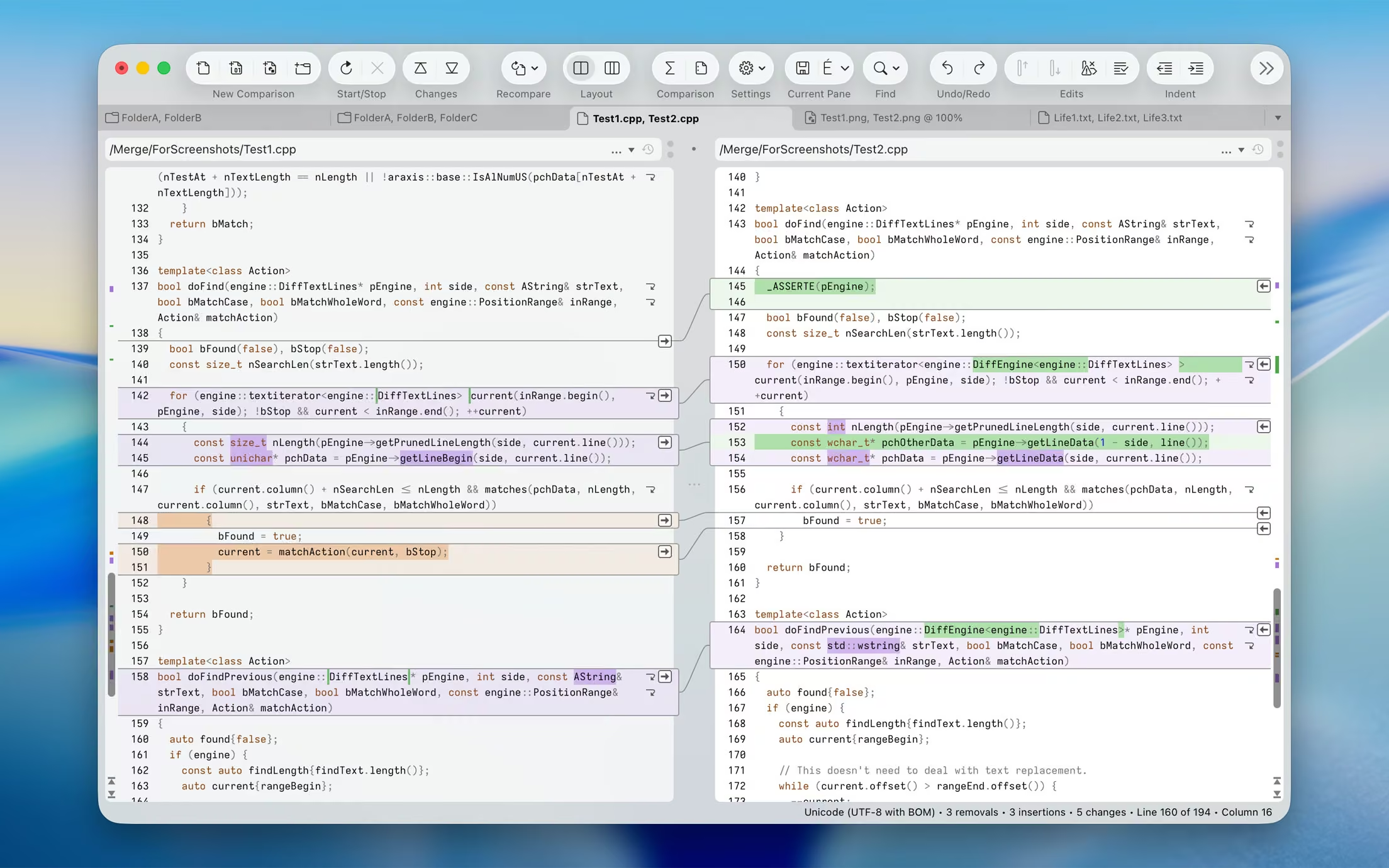
For software engineers and web developers: compare, understand, and merge different source file versions. Work quickly and accurately, whether you are comparing individual files or reconciling entire branches of source code. Use three-way comparison to integrate changes made by you and those made by a colleague, with a common ancestor version.

For legal and publishing professionals: instantly identify every change between different contract or manuscript drafts. Directly open and compare the text from Microsoft Office (Word and Excel), OpenDocument, PDF, and RTF files. Copy text from other applications (such as Microsoft Word) and paste it directly into a text comparison.

For code reviewers and auditors: identify in context every change made between two or three source code hierarchies. Create a standalone HTML or XML report of your findings. Add bookmarks and comments to a file or folder comparison, then save it as a single-file archive for emailing to other team members for review.

For release and quality control managers: compare different source code branches to give total confidence that you know and understand every change made to every file for a specific release. Compare product releases to be certain that only the expected files have been modified. Create an HTML or XML report of changes for audit purposes.

Other users: Whether you are working with multiple revisions of text files or need to keep multiple folder hierarchies in sync (for example, between a desktop and laptop machine), Merge could help save time and reduce errors by helping you to work quickly and accurately.


Text comparison and merging

Compare and work with different revisions of text files, such as program source code, XML, and HTML files. Merge can extract and compare the text from Microsoft Office, OpenDocument, PDF, and RTF files. XML files can be shown with special formatting, helping you to see changes more clearly. It supports files with ASCII, MBCS, and Unicode character encodings.

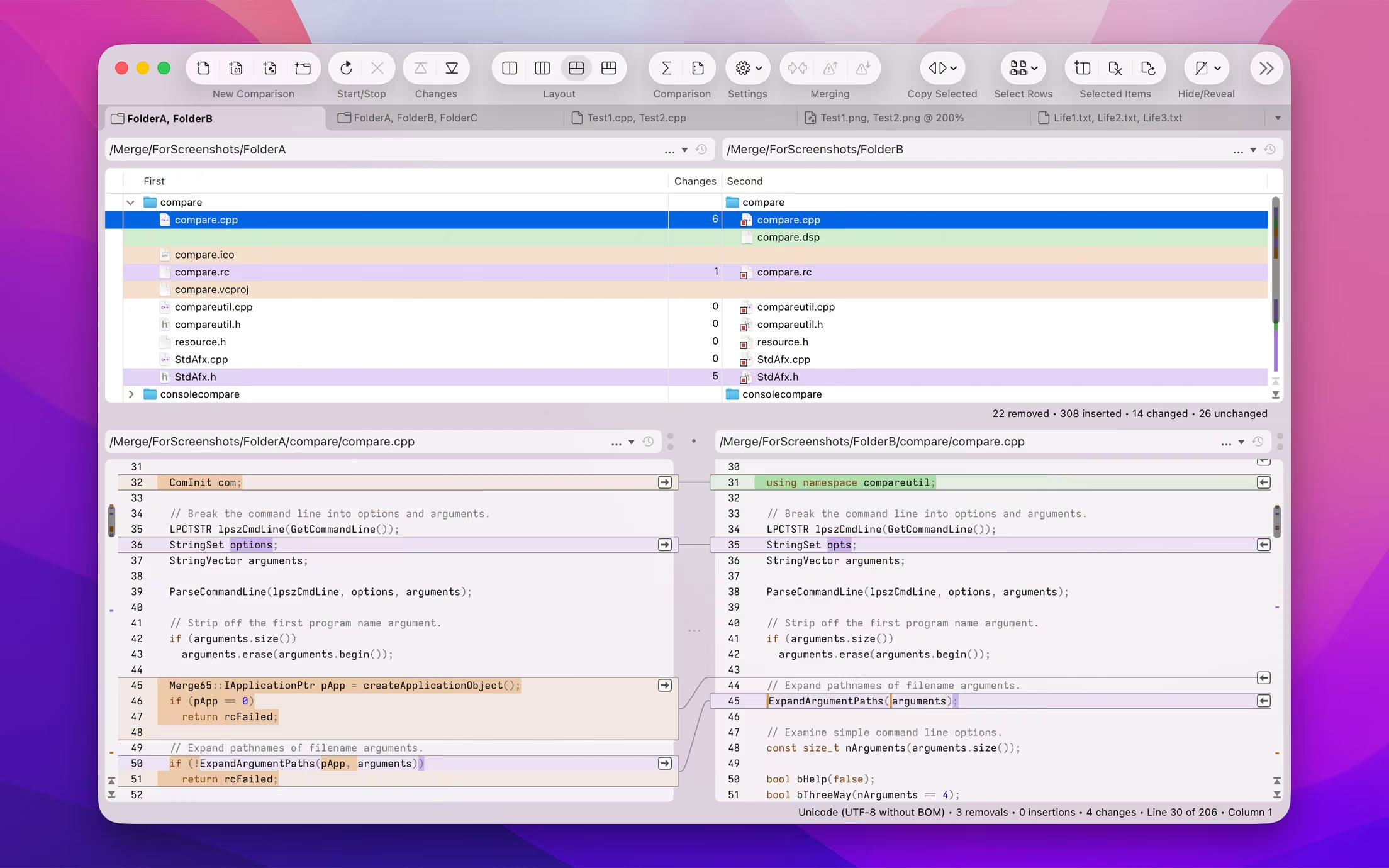
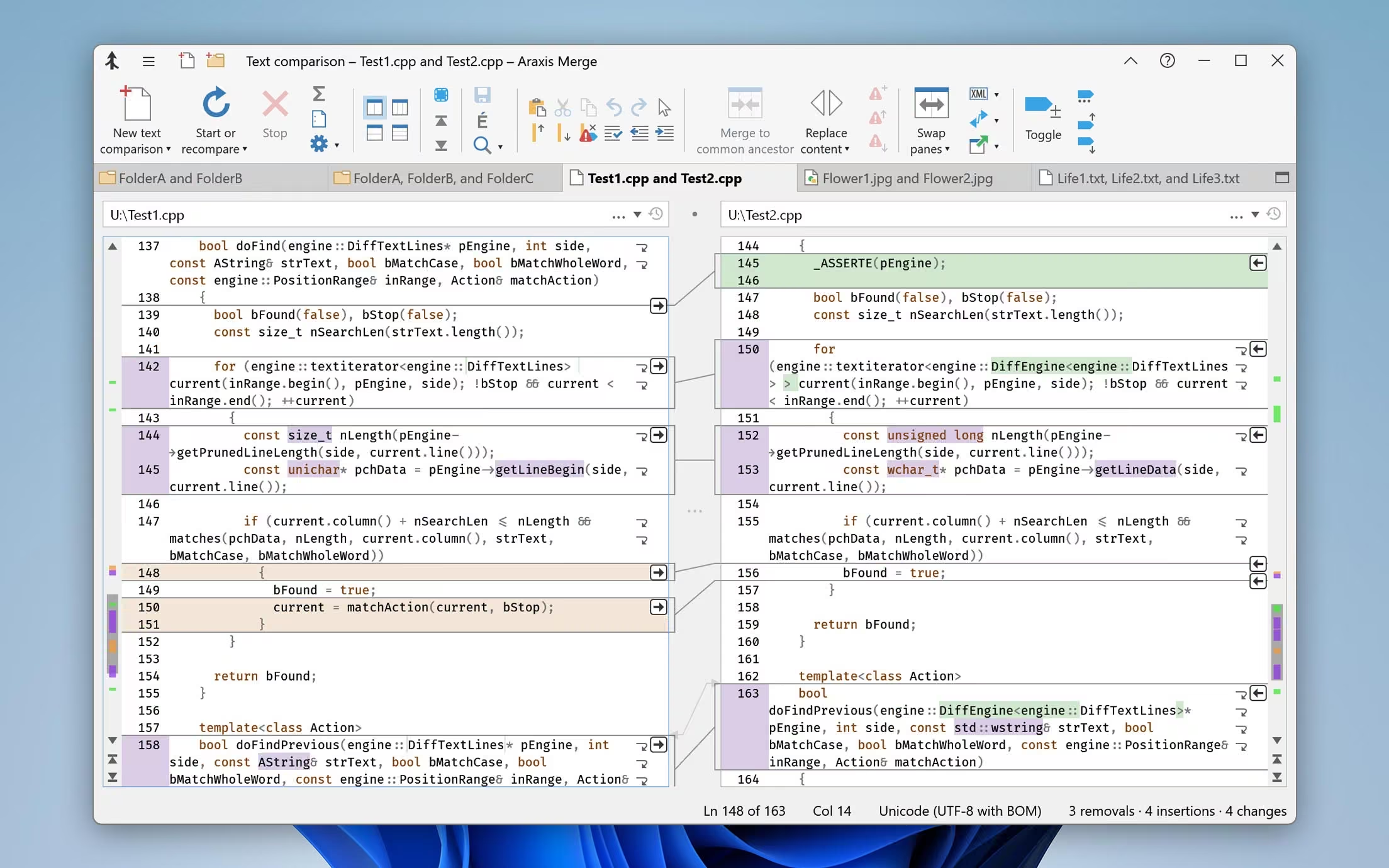
A colour-coded side-by-side comparison makes it easy to pinpoint at a glance similarities and differences between files. Linking lines are drawn between the documents showing clearly how they are related.

Point-and-click merging helps you choose the parts of each file that you would like to add to a final merged version by simply clicking buttons. The in-place editor with unlimited undo enables complete control over the merged file as you create it. The text comparison display dynamically updates as the merge progresses.

Merge shows detailed highlights of changes within lines. It can be configured to ignore differences in whitespace and line endings, as well as changes to lines that match specified regular expressions. The latter is useful for ignoring unimportant changes, such as timestamps or expanded version-control keywords.


Three-way comparison and automatic merging

[PROFESSIONAL EDITION]

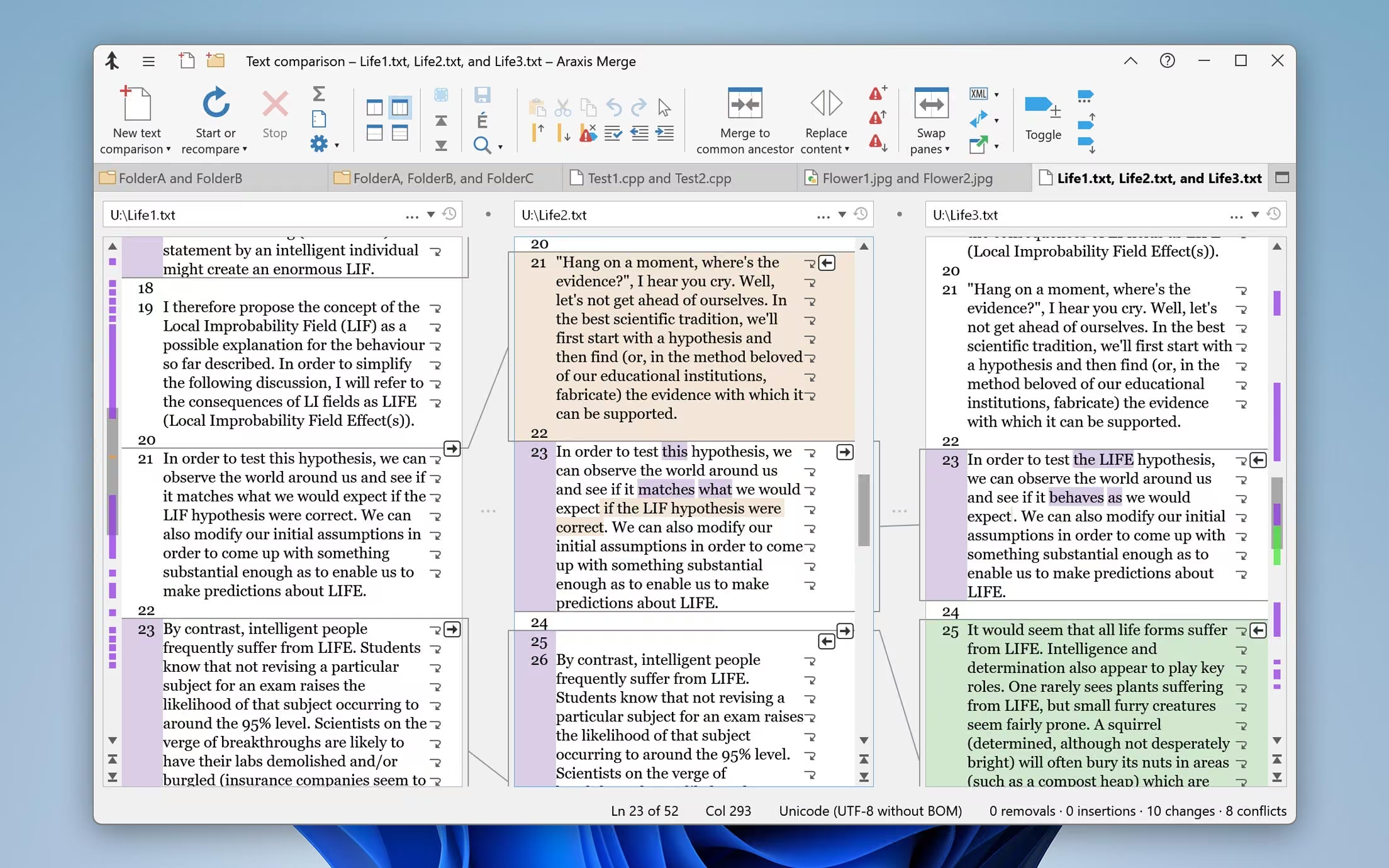
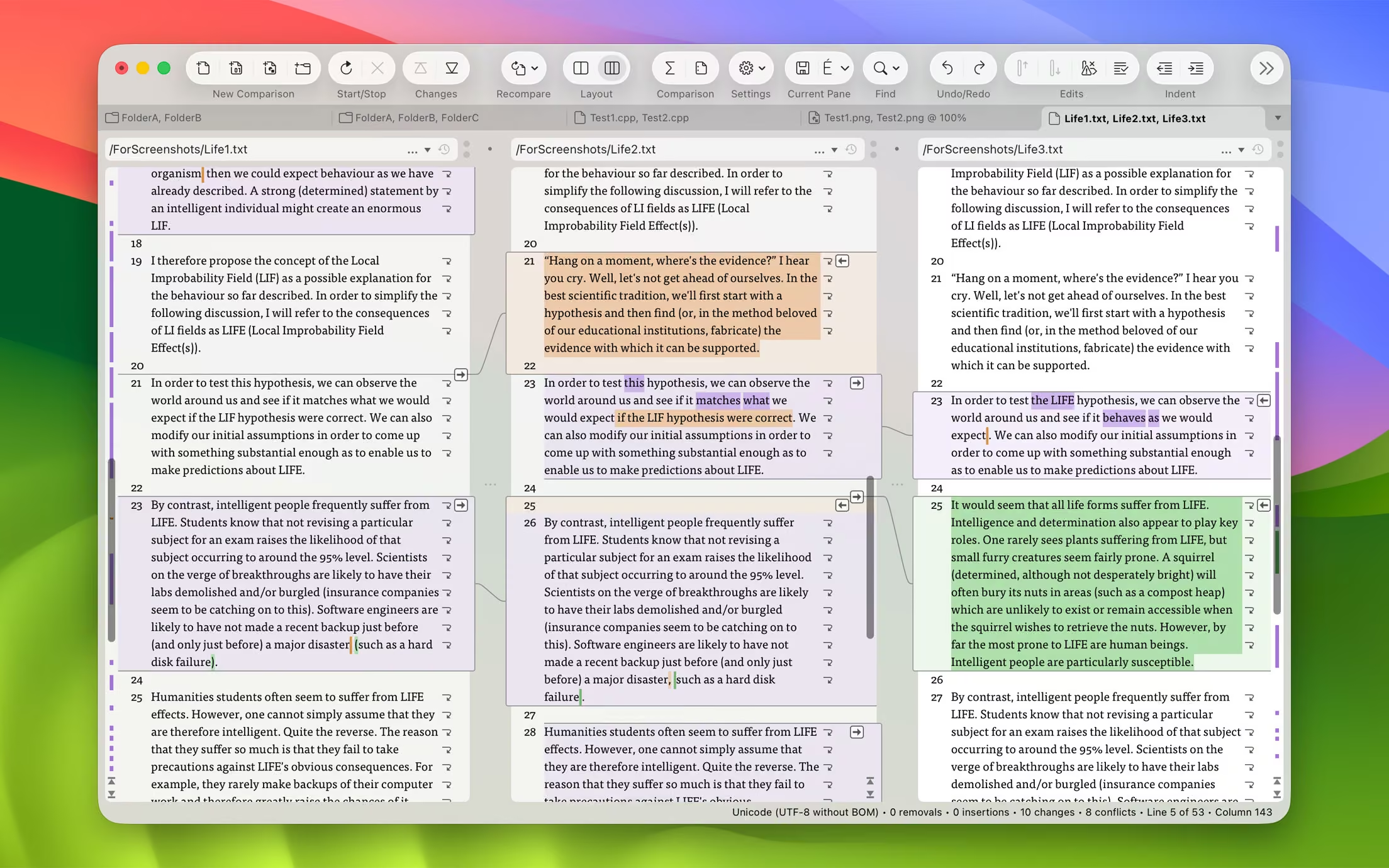
Merge Professional adds advanced three-way visual file comparison and merging to the Standard Edition’s two-way visual file comparison and merging. This is particularly useful when more than one person is working on the same set of files.

Automatic Merging enables swift reconciliation of even the largest files. Three-way file comparisons can be launched directly from a three-way folder comparison, allowing efficient integration of entire branches of source code.


Compare text from common office file formats

Extract and compare the text content from Microsoft Office, OpenDocument, PDF, and RTF files. Copy text from other applications and paste directly into a text comparison. (Note that office document layout and formatting is not shown in text comparisons.)


Image and binary file comparison

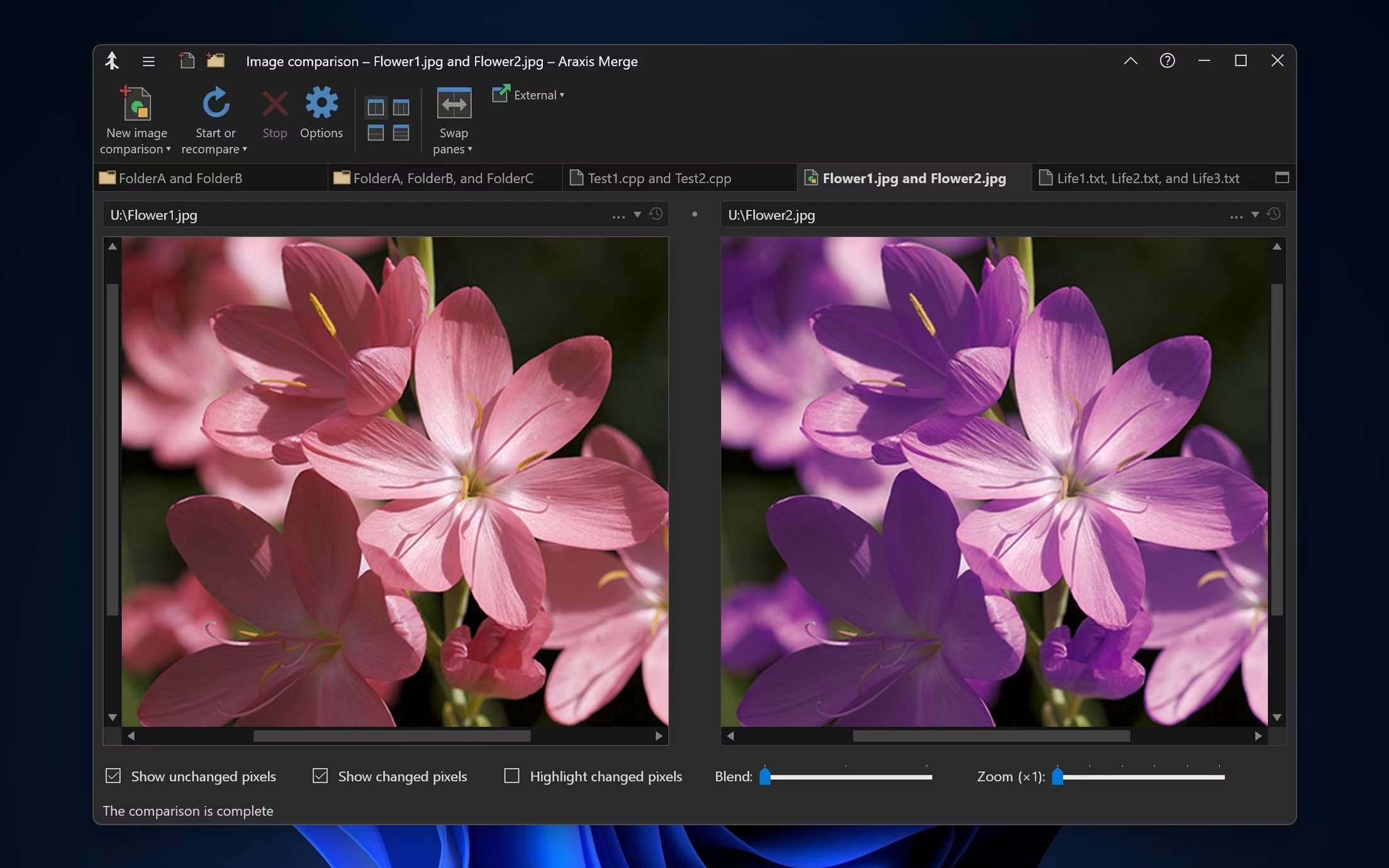
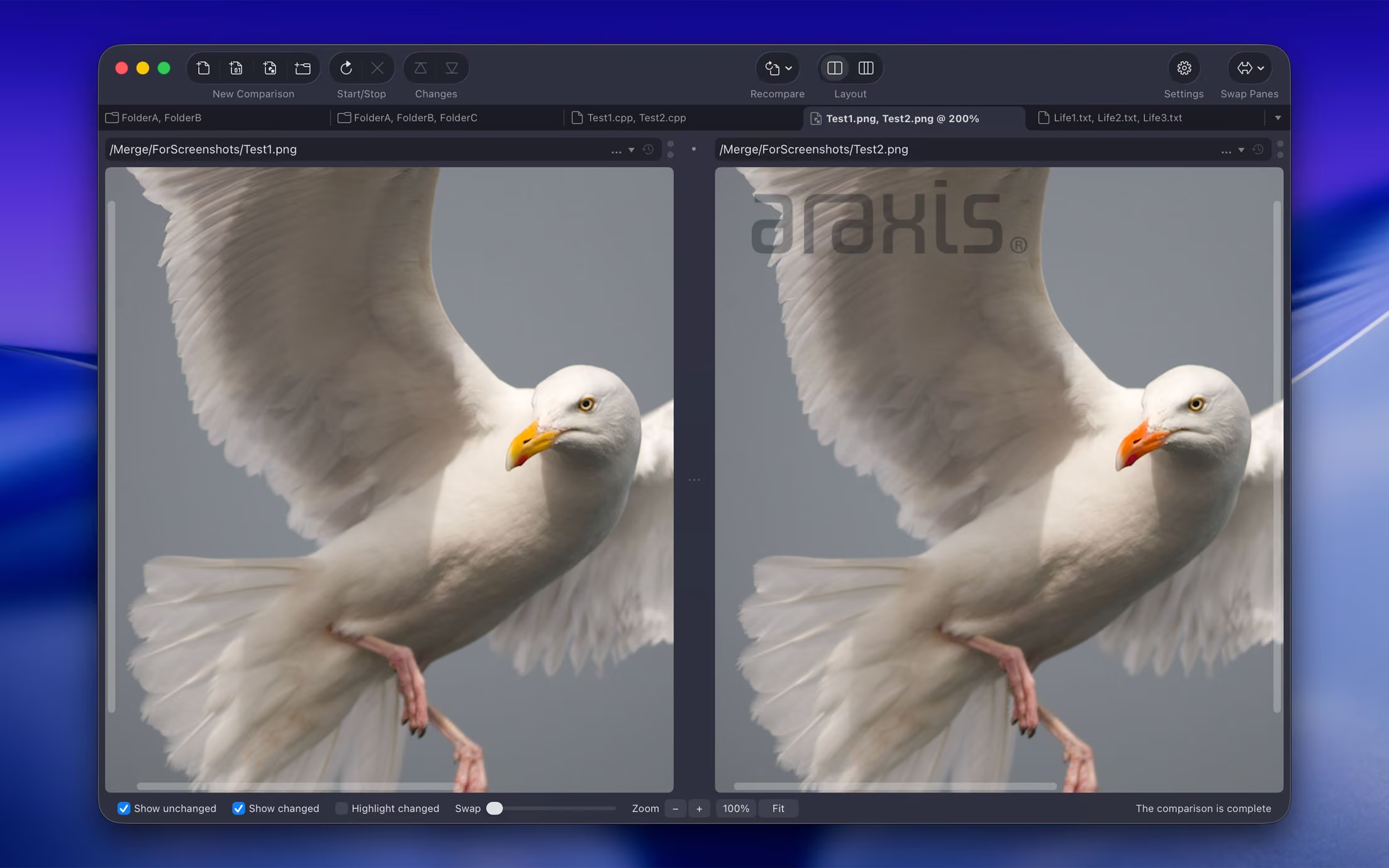
Merge doesn’t just compare text files. Use image comparison to compare many different types of image file and instantly see which pixels have been modified. Binary comparison enables you to identify differences in data files at a byte level.


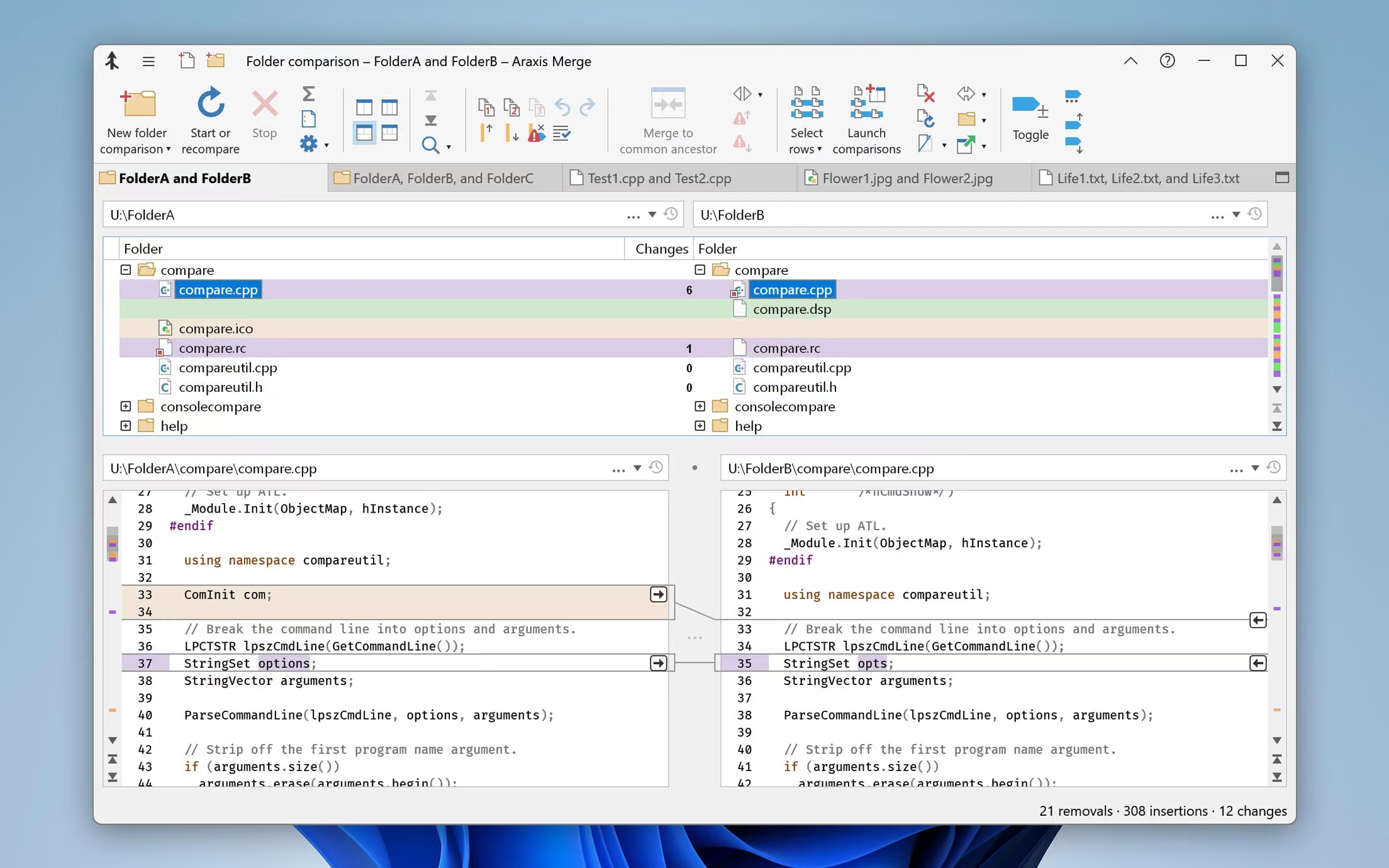
Folder hierarchy comparison and synchronization

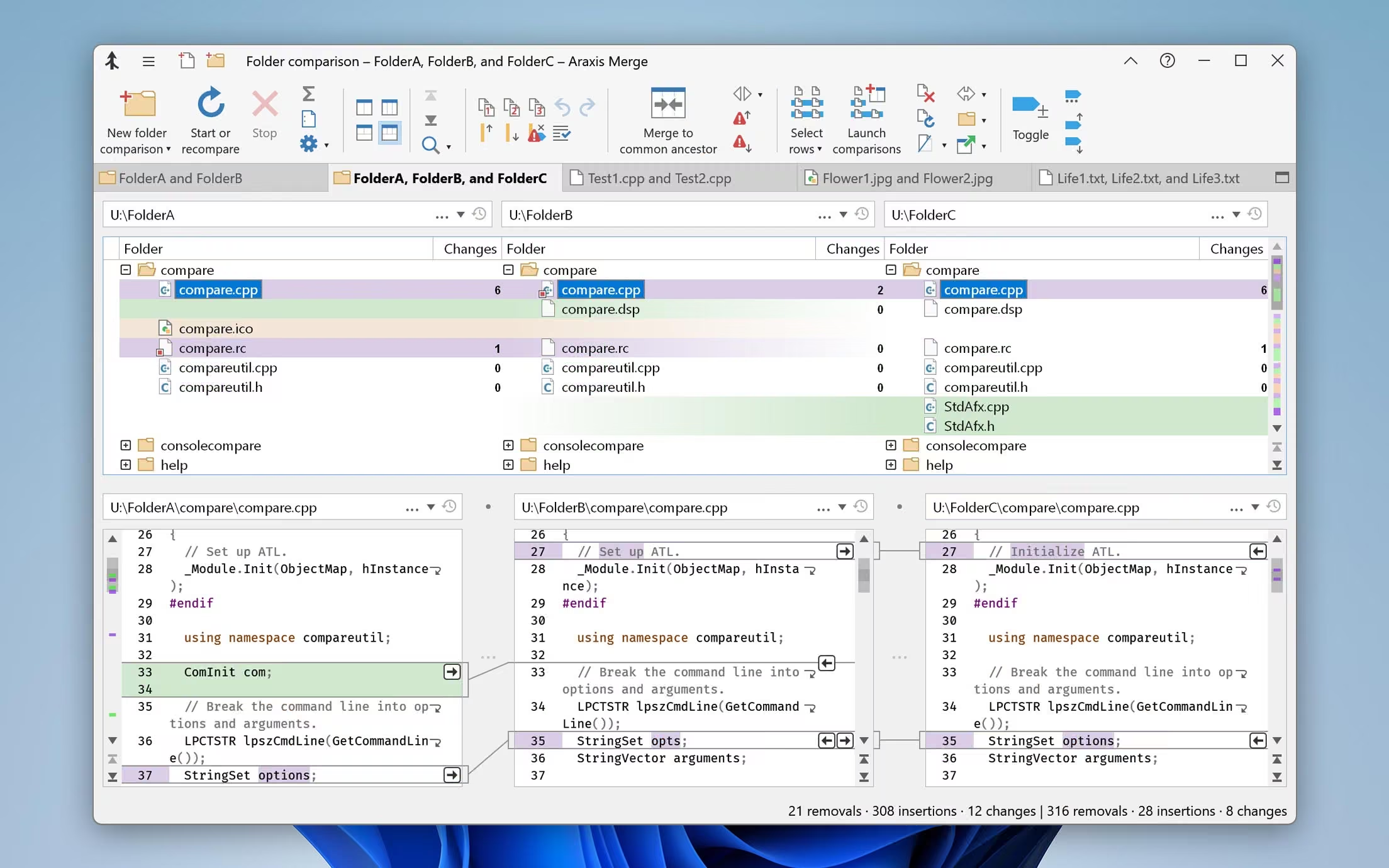
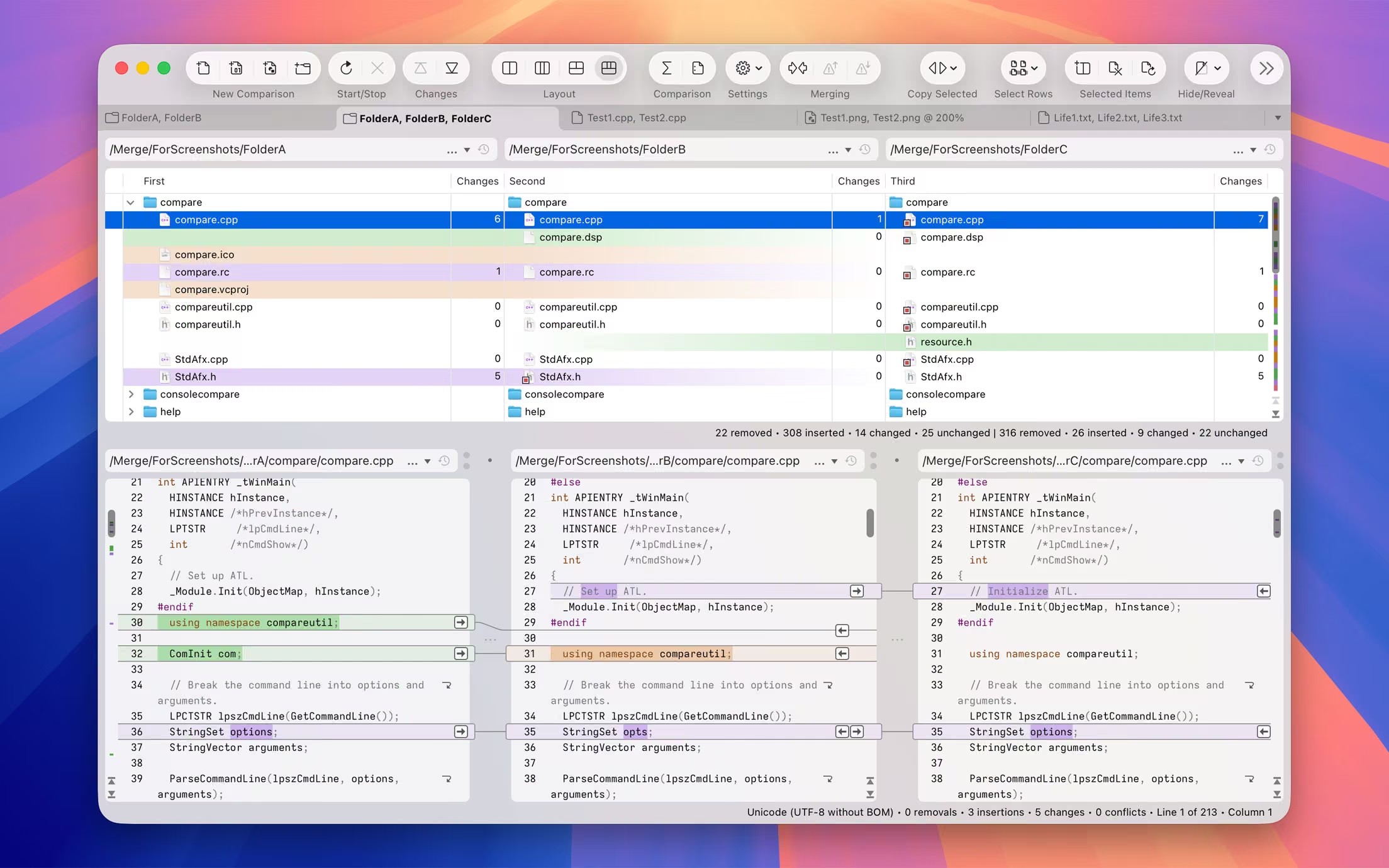
Merge supports folder hierarchy comparison and synchronization, enabling you to compare and merge entire directory trees. This is ideal for detecting changes in different versions of source code or web pages. You can even use the efficient byte-by-byte comparison option to verify the contents of recordable CDs or USB thumbsticks.

With support for a variety of archive formats (.zip, .tar, etc.), Merge enables you to compare archives as if they were folders†. Compare the contents of an archive to a folder to verify its contents, or to see which files have changed since the archive was created.

The Professional Edition of Merge supports three-way folder comparison (with automatic merging capability), enabling two revisions of a folder hierarchy to be merged with their common ancestor or some other folder hierarchy. This can be especially useful when used in conjunction with a source code control or software configuration management system.


† Archive support is only available on Windows.


Direct access to SCM (version control) systems

As well as being able to compare files and folders on local drives and network shares, Merge comes with plugins for Git, Mercurial, and Subversion. In addition to providing read-only access to older versions of the files you are comparing, the plugins make it possible to perform a folder comparison of a local Subversion client workspace against the repository. Alternatively, different branches (or the same branch at different points in time) within a repository can be directly compared.


Portable reports

File comparison reports can be created in HTML, HTML slideshow†, XML, or UNIX diff format. HTML reports are particularly useful for archiving and distribution. Folder comparison reports can be created in HTML or XML format.

A folder comparison report can, optionally, include file comparison reports for some or all of the files involved in the folder comparison. Thus it is possible to generate a report that is a complete record of all the differences in all of the files involved in a folder comparison.

This is especially useful in code review and code audit situations, particularly as reports can be generated directly for files and folders in configuration management systems for which there is a Merge plugin.


† HTML slideshow reports only available on Windows.


Printing, automation, and other advanced features

Other features include the ability to print a hard copy of file and folder comparisons, and to customize the behaviour and appearance of the application, including fonts, colours, and more.

A full Automation† or AppleScript‡ API and Command-Line Interface are included, allowing close integration with other applications (such as source/version control and software configuration management (SCM) systems) or your workflow.

Comprehensive online documentation is available from the Araxis website, including context-sensitive help for every dialog and dialog control.


† Automation API only available on Windows.‡ AppleScript API only available on macOS.


One perpetual licence, two platforms

A single licence entitles you to use Merge on both Windows and macOS – even simultaneously, if you wish.

Merge licences are perpetual. You can keep using the product you have purchased forever. Each licence also includes one year of entitlement to support and all product updates. After the first year, support/update entitlement can be renewed for just pennies a day.

Privacy Policy Company Overview

COMPANY

Our Location Career with LOGON Our Partners

SERVICES

Training Services Implementation Services Pre-Sales and Post-Sales Services Best Practices Consulting

GET IN TOUCH

Phone:
Hong Kong: +852 2512 8491
India: +91 70220 22744 / +91 63668 26133
Email: [email protected] ©2025 LOGON International Ltd. All rights reserved
logon logo WHITE

Search engine

Use this form to find things you need on this site

More results...

Fill in the form below
  • This field is for validation purposes and should be left unchanged.
  • This field is hidden when viewing the form
  • This field is hidden when viewing the form

Watch On-demand Webinar

  • This field is for validation purposes and should be left unchanged.

Get Your Free UserLock Trial

  • This field is for validation purposes and should be left unchanged.

Download Your Free Trial 10-Day Trial Today

  • Downloading and evaluating Smart Package Studio is quick and easy
  • Includes a short introductory guide that suggests smart features to try
  • Access the full functionality of Smart Package Studio during the trial
  • This field is for validation purposes and should be left unchanged.

Request for Priority Support with our support team

  • This field is for validation purposes and should be left unchanged.
  • Drop files here or
    Max. file size: 30 MB.

    Get Free Assessment of your Web Asset

    Request a free non-intrusive security assessment of your website. Get a report with an overview of client-side security risks.

    • This field is for validation purposes and should be left unchanged.
    • This field is hidden when viewing the form

    Recommend a Topic

    • This field is for validation purposes and should be left unchanged.

    Partner with Us on the next episode

    • This field is for validation purposes and should be left unchanged.

    Request Quote for Lansweeper

    Oops! We could not locate your form.

    Watch On-demand Webinar

    • This field is for validation purposes and should be left unchanged.
    Start PreCrime Network for Free

    Oops! We could not locate your form.

    Book a Free Demo Today

    Get Your Free Trial

    Oops! We could not locate your form.

    Get Your Free Trial
    • This field is for validation purposes and should be left unchanged.
    • This field is hidden when viewing the form
    • This field is hidden when viewing the form
    Request for Training Quote

    Oops! We could not locate your form.

    Request for Training Quote

    Oops! We could not locate your form.

    Request for Training Quote

    Oops! We could not locate your form.

    Request for Training Quote
    • This field is for validation purposes and should be left unchanged.
    • Please enter a number from 1 to 20.
    • This field is hidden when viewing the form
    Request for Training Quote
    • This field is for validation purposes and should be left unchanged.
    • Please enter a number from 1 to 20.
    • This field is hidden when viewing the form
    Request for Training Quote
    • Please enter a number from 1 to 20.
    • DD slash MM slash YYYY
    Request for Training Quote
    • This field is for validation purposes and should be left unchanged.
    • Please enter a number from 1 to 20.
    • DD slash MM slash YYYY
    Request for Training Quote
    • This field is for validation purposes and should be left unchanged.
    • Please enter a number from 1 to 20.
    • DD slash MM slash YYYY
    Request for Training Quote
    • This field is for validation purposes and should be left unchanged.
    • Please enter a number from 1 to 20.
    • This field is hidden when viewing the form