Navigation
  • SEARCH HERE
  • SOLUTIONS
    • Information Security Solutions
      • Enterprise Application Security Solutions in Asia
      • Network & Infrastructure Security Solutions
      • Zero Trust Security
      • Security Information and Event Management
      • Remote Monitoring & Management (RMM)
      • File Integrity Management
      • Systems Administration Tools
      • Data Loss Prevention
      • Data / Password Recovery
      • IT Management Solution Offering | Distributor in Asia
      • Identity and Access Management Solution Offering | Distributor in Asia
      • Employee Activity Monitoring (EAM)
      • Digital Forensic Investigation
    • Software Development Solutions
      • Integrated Development Environments
      • Development Components
        • UI Tools
        • Networking Components
        • Office Components
        • Barcode Components
        • Communication Components
      • Imaging Solutions
      • Software Localization
      • Release Automation & Management
      • eLearning Authoring Solutions
      • Charting Solutions
      • PDF Solutions
      • Reporting Solutions
      • Testing & QA
      • Text Retrieval / Enterprise Search
      • Database
  • Services
    • Live Solution Walkthroughs
    • Implementation Services
    • Best Practices Consulting
    • Pre-Sales and Post-Sales Services
  • What's New
    • Our Event
    • Our Blogs
    • Special Offers
  • About
    • About LOGON Software Asia
    • Our Partnership
  • Publishers - Join our network
  • Resellers - Expand your portfolio
Site logo
  • Solutions
    • Information Security Solutions
      • Identity and Access Management
        • Privileged Access Management (PAM)
        • Multi-Factor Authentication (MFA)
        • Identification Verification (IV)
        • Self-Service Password Reset (SSPR)
      • Network & Infrastructure Security
        • DDoS Mitigation and Protection
        • Digital Forensic Investigation
        • Malware Detection & Analysis
        • Network Monitoring Software
        • Email Security
        • Log Monitoring
      • Endpoint & Device Security
        • Patch Management
        • Remote Monitoring & Management (RMM)
        • Employee Activity Monitoring (EAM)
        • Mobile Device Management (MDM)
      • IT Management
        • IT Service Management
        • IT Asset Management
        • Software Asset Management
        • Hardware Asset Management
        • Software License Management
        • Systems Administration Tools
      • Application Security
        • Development Security | Shift Left AppSec | SAST, SCA, IAST
        • Runtime Protection Solutions | DAST, RASP, WAF, Container Security
        • Strategic Management Solutions | ASPM, MAST, VAPT
      • Data Security
        • Data Loss Prevention
        • File Integrity Management
        • Data / Password Recovery
        • Data Security Posture Management
      • Cloud Security
        • Cloud Security Posture Management
        • Cloud Work Protection
      • External Attack Surface Management
        • Cyber Threat Intelligence
        • Third Party Risk Management
      • Security Operations & Incident Management
        • Security Information and Event Management
        • Security Orchestration, Automation and Response (SOAR)
      • Zero Trust Security
    • Software Development Solutions
      • Integrated Development Environments
      • Imaging Solutions
      • UI Tools
      • Charting Solutions
      • Database
      • Networking Components
      • Office Components
      • Barcode Components
      • Release Automation & Management
      • Software Localization
      • Communication Components
      • Automated Testing
      • eLearning Authoring Solutions
      • Reporting Solutions
      • Text Retrieval / Enterprise Search
      • Testing & QA
  • Services
        • Live Walkthrough Sessions

          Experience the full feature of our key solutions through live platform

          View All Sessions >
        • Implementation Services
        • Pre-Sales and Post-Sales Services
        • Best Practices Consulting
  • Partners
    • Our Partners
    • Partner with LOGON Today!
      • Vendors - Join Our Network
      • Resellers - Expand Your Portfolio
      • Procurement Managers
  • Resources
        • ABOUT US

        • About Us
        • Our Locations
        • Careers@LOGON - We are hiring !
        • DISCOVER

        • Our BlogsNEW BLOGS
        • Our EventsJOIN UPCOMING EVENTS
        • LOGON to CyberSecurity PodcastNEW EPISODES
        • GET HELP

        • Contact Us
        • Help Desk
        • Request a Demo
        • Request a Quote
        • COMPLIANCE

        • 🇭🇰 Hong Kong PDPO
        • 🇮🇳 India DPDP Act
        • 🇸🇬 Singapore PDPA
        • 🇹🇭 Thailand PDPA
  • More results...

View large
Elcomsoft Blog

The iPhone Upgrade: How to Back Up and Restore iOS Devices Without Losing Data

The iPhone Upgrade: How to Back Up and Restore iOS Devices Without Losing Data

This article is originally posted by our partner, Elcomsoft. Click here to view their original article.

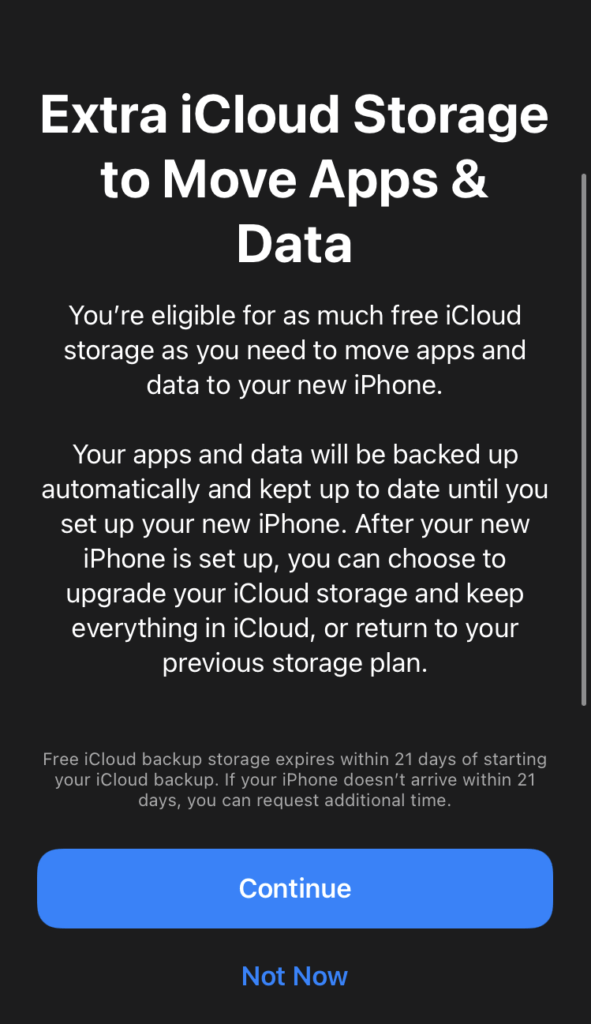
iOS 15 is about to bring a host of new features, some of which will have forensic implications. Today we’ll cover a feature that can help experts do cloud analysis, creating and extracting a copy of the device’s data even if the user does not have enough free space in their iCloud account via temporary iCloud backups. The temporary backups are designed to speed up the migration when changing Apple devices; they are not affected by the storage quota, but have a limited lifetime.

One of the main problems of iCloud forensics (unknown account passwords aside) is the sporadic nature of cloud backups. Experts often find out that a given user either does not have device backups in their iCloud account at all, or only has a very old backup. This happens primarily because of Apple’s policy of only granting 5GB of storage to the users of the free tier. While users can purchase additional storage for mere 99 cents a months, very few do so. iCloud Photos, downloads and other data quickly fill up the allotted storage space, leaving no space for a fresh cloud backup.

Now when you buy a new device you can use iCloud Backup to move your data to your new device, even if you’re low on storage. iCloud will grant you as much storage as you need to complete a temporary backup, free of charge, for up to three weeks. This allows you to get all your apps, data, and settings onto your device automatically. Apple

The ability to wirelessly back up and restore an iPhone is one of the hallmarks of the ecosystem. Currently, users can wirelessly transfer the content of an old iPhone onto a new device regardless of how much free space they have in iCloud. The problem, however, is that the process effectively backs up the original iPhone (which may take a lot of time), and restores the data onto the new device. The migration process occurs much faster without the first step, so in iOS 15 Apple offers an option to back up the iPhone temporarily whenever convenient, then restore the temporary backup onto a new (or even the same) iPhone. Unlike traditional iCloud backups, these temporary backups have the following properties:

  • Requires iOS 15 on both devices
  • Must be created manually (no scheduled temporary backups possible); device must be unlocked
  • Does not count against iCloud storage quota
  • Retained for 21 days, automatically deleted afterwards
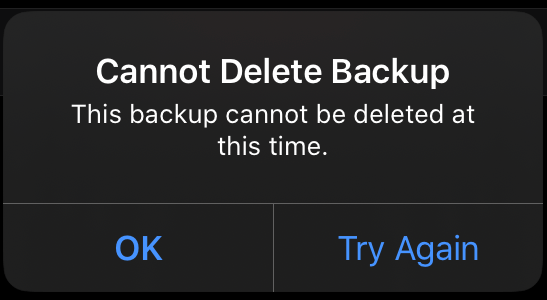
  • Currently, users cannot manually delete temporary backups (might be a bug in the beta version)

Creating a temporary backup

To create a temporary backup, do the following.

  1.  Update device to iOS 15.

2. Open the ‘Transfer or Reset iPhone‘ tab (Settings/General/Transfer or Reset iPhone). In earlier versions of iOS this was the ‘Reset’ tab.
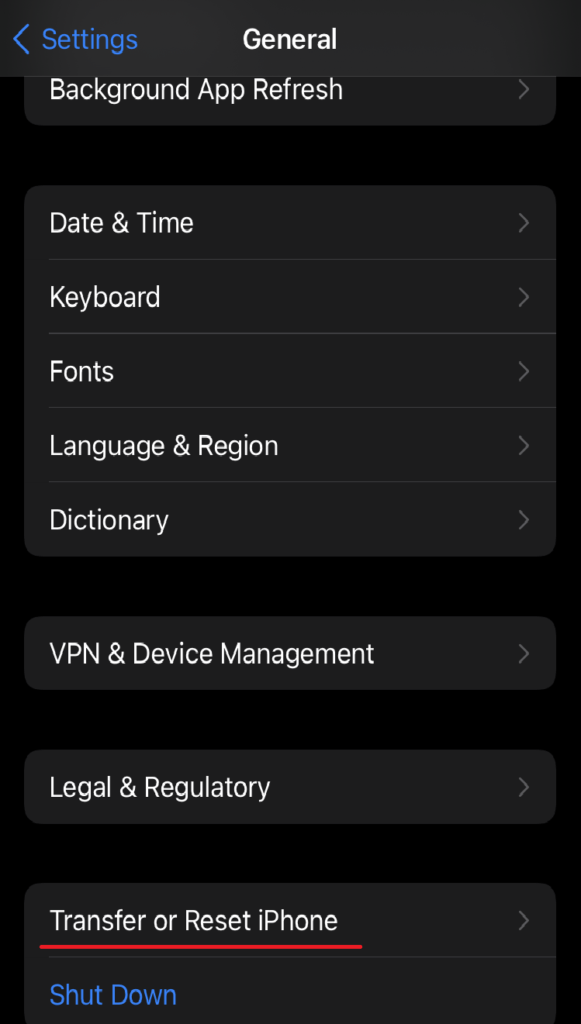
3. Click through the information screens.

4. When you create the backup, the Settings app will display its progress (iCloud Backup In Progress).

Once the backup is complete, you can see it in iCloud. Note that the backup does not count against storage quota.

Extracting and analyzing temporary backups

Currently, iOS 15 is still in beta. However, we have already added support for temporary iCloud backups to Elcomsoft Phone Breaker (Forensic edition). You can view these backups with Elcomsoft Phone Viewer. Elcomsoft Phone Breaker is the only tool on the market allowing to extract iCloud backups with no strings attached.

The following screen shot demonstrates how the 8.6GB backup is successfully created in the iCloud account with only 5GB of free storage.

At this time, users cannot manually delete temporary backups. This might be a bug in the beta version of iOS 15.
Conclusion

Temporary backups will have their use in mobile forensics, albeit a limited one. These backups can be only created manually, with the phone unlocked, which raises the question of making a local backup instead, which will contain a larger set of data. For this reason, temporary backups may be handy if you are unable to create or decrypt a local backup, e.g. if the device’s Lightning port is damaged or if you cannot reset the backup password.

With the release of iOS 15, we expect a significant influx of users upgrading to iCloud+ to use features such as Private Relay and Hide My Email. In addition to these features, users will receive 50GB of cloud storage, which will reopen the possibility to create regular cloud backups, decreasing the significance of temporary backups even further.

Contact Us Today

FOLLOW US ON

  • LinkedIn
  • Facebook
  • Instagram
  • Twitter
  • YouTube
Read Next:
Acunetix BlogBlogInvicti Blog
Acunetix Is Now Invicti Web + API
BlogIdentity and Access Management BlogLOGON Blog
Password Resets Aren’t Enough: What the Updated Five Eyes Active Directory Guidance Means for Identity Security
BlogCloud Security BlogIdentity and Access Management BlogLOGON Blog
When Passkeys Become the Bait: A New Wave of Voice Phishing Targeting Microsoft 365

Privacy Policy Company Overview

COMPANY

Our Location Career with LOGON Our Partners

SERVICES

Training Services Implementation Services Pre-Sales and Post-Sales Services Best Practices Consulting

GET IN TOUCH

Phone:
Hong Kong: +852 2512 8491
India: +91 70220 22744 / +91 63668 26133
Email: [email protected] ©2025 LOGON International Ltd. All rights reserved
logon logo WHITE

Search engine

Use this form to find things you need on this site

More results...