

 Elcomsoft Phone Viewer
 Elcomsoft Phone Viewer
Analyze information extracted with ElcomSoft and third-party acquisition tools with a fast, lightweight viewer. Decrypt and view iOS backups and synced data, browse iOS file system images, analyze iCloud Photo Library and access synchronized data with ease.
Download Free Trial Version
-
Lightweight forensic viewer requiring no learning curve
-
Analyze data extracted by ElcomSoft acquisition tools
-
Export evidence to continue analysis in third-party tools
-
View information unavailable in other forensic tools
New Features
Analyze iOS 15 Backups and Cloud Data
Elcomsoft Phone Viewer supports all versions of iOS up to and including the latest iOS, iPadOS and tvOS 15 releases. The tool can display the content of iTunes and iCloud backups and synchronized data produced by devices running the new OS. Elcomsoft Phone Viewer supports all generations of iPhone and iPad devices including the iPhone 13 range and all the new iPads. The tool can also display information acquired from companion devices such as Apple TV HD and Apple TV 4K.
Analyze Windows Timeline
The tool can now help analyze the user’s activities by displaying Windows 10 Timeline data downloaded from the user’s Microsoft account with Elcomsoft Phone Breaker. The data enables experts’ access to timestamped information about the app usage, searches and opened Web pages.
Explore the content of local and cloud backups produced by all versions of iOS and review synchronized data available in Apple iCloud and Microsoft Accounts! Elcomsoft Phone Viewer is a small, lightweight tool enabling read-only access to contacts, messages, call logs, notes and calendar data located in mobile backups. In addition, the tool displays essential information about the device such as model name, serial number, date of last backup etc. Finally, the tool implements access to deleted SMS and iMessages stored in iOS backups.
A Perfect Viewing Companion
Yet another “me too” forensic viewer? We looked hard for a tool we could recommend to our customers for viewing data decrypted or downloaded with Elcomsoft Phone Breaker. No single tool on the market meets our stringent requirements on speed, compatibility and ease of use. That’s why we introduced a viewing tool of our own.
Elcomsoft Phone Viewer is the ideal viewing companion for Elcomsoft Phone Breaker, enabling full support for all data formats produced by this tool. Regularly maintained and timely updated, Elcomsoft Phone Viewer is the first to receive support for the latest mobile backup formats extracted, downloaded or decrypted with other ElcomSoft tools. Using our mobile acquisition tools? Elcomsoft Phone Viewer is a perfect companion!
Note that Elcomsoft Phone Viewer can only open unencrypted backups as well as iTunes backups with a known password. Should you have a backup file encrypted with an unknown password, use Elcomsoft Phone Breaker to recover the password.
Analyzes Online Activities
Elcomsoft Phone Viewer displays the user’s online activities including Web browsing history and search queries, browser bookmarks and opened tabs including page snapshots. Information about recent search queries and last visited Web sites already helped solve multiple cases, and will undoubtedly help investigating crime.
Access to Synced Data, Passwords and Messages
Information such as call logs, contacts, notes, calendars as well as Web browsing activities including Safari history (including deleted items), bookmarks and open tabs can be synced with Apple servers. Unlike iCloud backups that may or may not be created on daily basis, synced information is pushed to Apple servers just minutes after the corresponding activity has taken place. Once uploaded, synced data can be retained for months with no option for the end user to clear the data or disable the syncing.
Synchronized records can be obtained for extended periods of time; much longer than available in iOS devices and device backups. Existing and deleted records are obtained, and filter can be applied to only display deleted records.
Elcomsoft Phone Viewer is ElcomSoft’s stock tool for viewing synced data extracted from Apple iCloud with Elcomsoft Phone Breaker. The following types of synced data can be viewed:
- Messages in iCloud: complete with attached media files and documents
- Safari (browsing history, bookmarks, tabs opened on user’s devices)
- Voice Memos
- Calendars, notes and contacts
- Call logs (information about calls made and received)
- Apple Maps (routes, places, searches)
- Wi-Fi (wireless access points, MAC addresses, date and device added)
- Wallet (everything except payment data)
- Account info (comprehensive information about the user and devices registered on the Apple ID account)
Multimedia Gallery
Elcomsoft Phone Viewer can display pictures and videos captured with the phone or saved by one of the many apps. But don’t you worry, there won’t be a big mess of thousands of images appearing in a single thumbnail gallery. The files will be automatically split into a number of categories, making it easy to discover which pictures were captured with the phone’s camera, or received as messages or attachments. A separate category filters out system and application images such as buttons, logos and splash screens. Album view is available to allow you better navigate through thousands of images.

Aggregated Locations
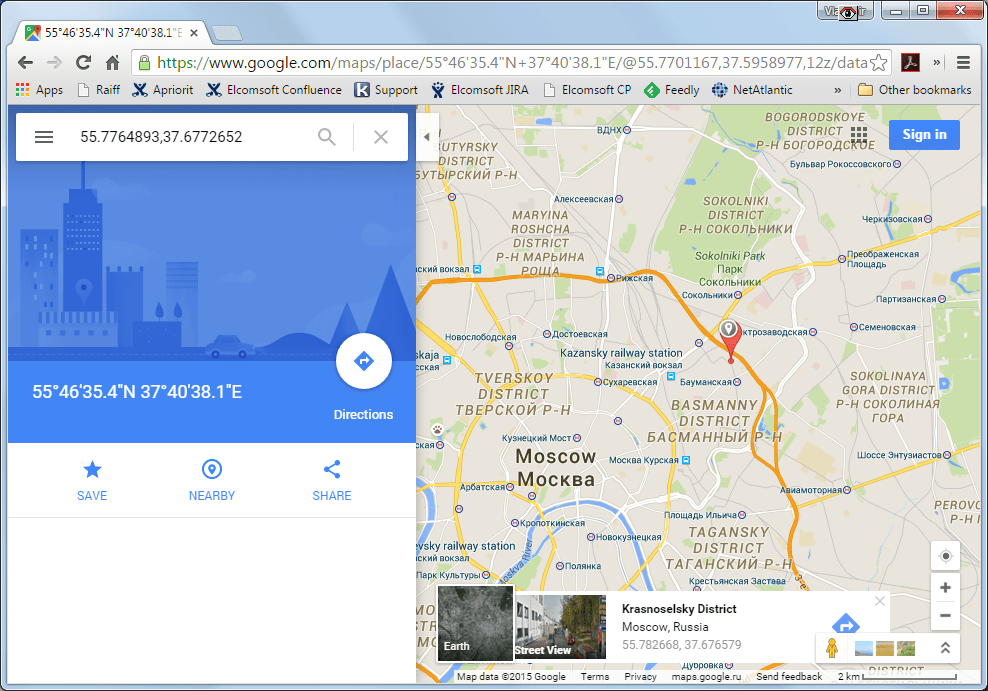
Multiple sources of location data may be available in a given backup or image. Location data may be found in calendar events, iMessage attachments, map caches and system logs. Geolocation is one of the most important EXIF tags available. Elcomsoft Phone Viewer will automatically extract location data from multiple sources, and map the locations with OpenStreetMap. The ability to map GPS coordinates extracted from multiple sources can become extremely handy during investigations.
Analyze Apple Health Data
Health data can serve as essential evidence during investigations. At very least, the data includes step count, running and walking distances with exact timestamps the user was walking or running. Significantly more evidence is available if the user wears a HealthKit compliant device such as the Apple Watch or a third-party fitness tracker. A multitude of third-party apps may contribute to Health data significantly.
Elcomsoft Phone Viewer can display Health data stored in password-protected iTunes backups and file system images obtained from iOS devices in TAR/ZIP format with Elcomsoft iOS Forensic Toolkit or GrayKey during physical extraction.
TAR Images: The iOS File System
Since the introduction of the iPhone 5s, Apple’s first 64-bit iPhone, physical acquisition has never been the same. For all iPhone and iPad devices equipped with Apple’s 64-bit processors, physical acquisition is exclusively available via file system imaging. The imaging is performed on the device itself in order to bypass full-disk encryption. Regardless of the tool performing physical acquisition, the result of these efforts is always a TAR archive containing an image of the device’s file system. Elcomsoft iOS Forensic Toolkit produces TAR files as the result of the “F” (File System) command.
Up until now, most tools available for analyzing information inside these TAR images were integral parts of fully-featured forensic toolkits. The expert’s choice would be limited to either time-consuming and labour-intensive manual analysis requiring a high level of expertise, or a highly sophisticated and complex forensic suite, with nothing in between. Elcomsoft Phone Viewer offers the lightweight and convenient third option, enabling fast and easy analysis of evidence found in the results of physical acquisition.
| Trial | Standard | Forensic | |
|---|---|---|---|
| Data sources | |||
| iTunes backups | ✓ | ✓ | ✓ |
| Encrypted iTunes backups with known password | ✓ | ✓ | ✓ |
| iCloud backups downloaded with Elcomsoft Phone Breaker | ✓ | ✓ | ✓ |
| iCloud synchronized data downloaded with Elcomsoft Phone Breaker | ✓ | ✓ | ✓ |
| iOS device image created by Elcomsoft iOS Forensic Toolkit or GrayKey device | – | – | ✓ |
| BlackBerry backups | ✓ | ✓ | ✓ |
| Microsoft Cloud data | ✓ | ✓ | ✓ |
| View | |||
| Calls, Contacts, Calendars, Tasks | Last 10 records only | ✓ | ✓ |
| Apple Health | Only 10 recent records are displayed in each category | ✓ | ✓ |
| iCloud photos | Copying file properties is not allowed | ✓ | ✓ |
| Media files | Copying file properties is not allowed | ✓ | ✓ |
| SMS & iMessages | Last 10 records only | ✓ | ✓ |
| Notes | Last 10 records only | ✓ | ✓ |
| Notifications | Last 10 records only | ✓ | ✓ |
| Voice Memos | Last 10 records only | ✓ | ✓ |
| Web and History data | Last 10 records only | ✓ | ✓ |
| Wi-Fi connections | Last 10 records only | ✓ | ✓ |
| Skype data | Last 10 records only | ✓ | ✓ |
| Keychain records | Only 2 first characters of passwords are displayed | ✓ | ✓ |
| Apple Pay transactions | – | – | ✓ |
| Signal messages | – | – | ✓ |
| Telegram messages | – | – | ✓ |
| Export | |||
| Export data to Microsoft Excel | – | Contacts and Notes categories can be exported only | ✓ |
Supported Data Types
Elcomsoft Phone Viewer enables access to the following information:
System Data
- Device model name
- Device serial number
- Date/time of backup
- Other essential information (for iOS devices: IMEI, device IDs, phone number, iOS version)
User Data
- File system images (TAR files)
- Contacts (aggregated, i.e. including ones synced with Facebook, Gmail etc.)
- Messages (including deleted SMS and iMessages in iOS backups)
- Apple Health data
- Voice Memos
- Screen Time data including the list of installed apps on all devices sharing Screen Time through iCloud
- Messages and attached files (media, documents etc.) downloaded from iCloud
- Wi-Fi networks along with passwords, first and last connection time
- List of installed apps
- Locations
- Notifications
- Notes (for Windows Phone, in Microsoft OneNote format)
- Call Logs (incl. FaceTime)[1]
- Calendar (for all accounts, from local to Microsoft Exchange and iCloud)[1]
- Search queries, browsing history, bookmarks and open tabs with page snapshots [1]
- Images and videos with album support
- Photos from iCloud Photo Library
- Synced data from iCloud such as call logs, Safari tabs and browsing history, calendars, notes etc.
- Screen Time and Restrictions passwords
- Signal and Telegram conversation history including secret chats
- Windows 10 Timeline
- OneDrive and OneDrive Vault
For iOS device backups, Elcomsoft Phone Viewer can work with ones in the original iTunes format, and supports backups with converted/restored file names. Partial backups (select categories downloaded from iCloud) are also supported.
Supported Devices
Elcomsoft Phone Viewer supports information saved to local or cloud backups by all of the following devices:
Apple iOS 6 to iOS iOS 15, iPadOS (iTunes and iCloud backups):
- iPhone (all models from iPhone 3GS up to the current generation)
- iPad (all models including from the original iPad to the latest generation models, including all generations of iPad Air and iPad Pro)
- iPod Touch (starting from the 4th generation)
BlackBerry 10
- BlackBerry 10 backups created with BlackBerry Link and decrypted with Elcomsoft Phone Breaker (password for BlackBerry ID is required)
Microsoft Accounts
- Data obtained from the user’s Microsoft Account with Elcomsoft Phone Breaker
- Not available for Windows Phone.
Windows
- Windows 7
- Windows 8
- Windows 8.1
- Windows 10
- Windows 11
Apple macOS
- macOS 10.13 High Sierra
- macOS 10.14 Mojave
- macOS 10.15 Catalina
- macOS 11 Big Sur
- macOS 12 Monterey
Trial limitations
Trial version shows only last 10 records in every category.
Latest Updates

Password Recovery and Data Decryption: Getting Around and About | Elcomsoft

Approaching iOS Extractions: Choosing the Right Acquisition Method | Elcomsoft

Cloud Forensics: Obtaining iCloud Backups, Media Files and Synchronized Data | Elcomsoft

iOS Forensic Toolkit 8.0 Now Official: Bootloader-Level Extraction for 76 Devices | Elcomsoft
Elcomsoft iOS Forensic Toolkit 7.60 extends agent-based full file system extraction

Low-Level Extraction of iOS 15.2-15.3.1 | Elcomsoft

Breaking Windows Passwords: LM, NTLM, DCC and Windows Hello PIN Compared | Elcomsoft

checkm8 Extraction: iPhone 7 | Elcomsoft

Apple TV 4K Keychain and Full File System Acquisition | Elcomsoft

Building an Efficient Password Recovery Workstation: Power Savings and Waste Heat Management | Elcomsoft

Apple Mobile Devices and iOS Acquisition Methods | Elcomsoft

Agent-based full file system and keychain extraction: now up to iOS 14.8 | Elcomsoft

Real-Time Surveillance via Apple iCloud | Elcomsoft

The Five Ways to Recover iPhone Deleted Data | Elcomsoft

iCloud Extractions Without Passwords and Tokens: When a Trusted Device is Enough | Elcomsoft

The iPhone Upgrade: How to Back Up and Restore iOS Devices Without Losing Data
LOGON is a pan-asian company operating in China, Hong Kong (HK), India, Singapore, Malaysia, Indonesia, Vietnam, Philippines and Thailand. LOGON has local dedicated trained product specialists in Hong Kong, Guangzhou, Kuala Lumpur, Mumbai and Bangalore. LOGON acts both as value added reseller and sole distributor for award winning software solutions. Customers can buy new licenses, purchase upgrades and renewals from any of our local offices. Contact us for first line support during evaluations, PoCs. We offer best practices consulting services and classroom & online training. Check our site for latest offers, special discounts, bundle deals, etc..


