

Blog, FastReport Blog
New version of FastReport .NET 2022.1 | Fast Reports

New version of FastReport .NET 2022.1

This update was published by our partner Fast Reports. To view the original article, please click here.
The release of version 2022.1 in FastReport .NET took place. A large number of new features and changes have been made.
New features
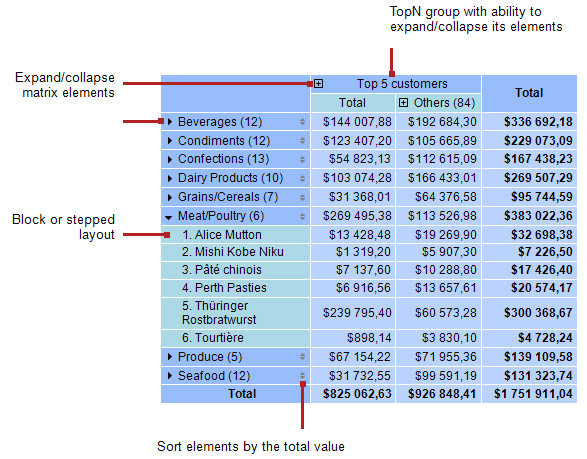
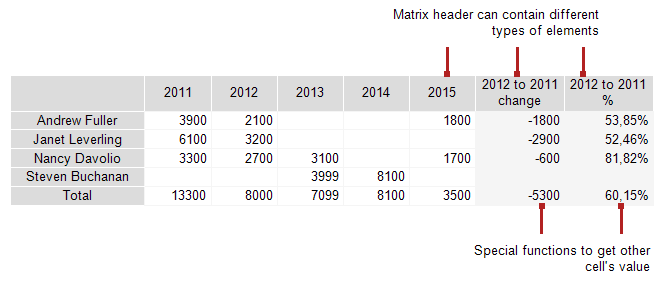
Added new “Advanced Matrix” object:

Here is a list of its key features:
- row and column headers can contain groups and simple elements in any order. This allows you to build asymmetric reports;
- collapse buttons allow you to interactively manage the visibility of individual elements;
- sorting buttons allow you to interactively sort the matrix by the selected values, including the total values;
- Top N grouping allows you to display N values in the header, and group the remaining values into a separate element with the ability to expand;
- output of matrix headers in a stepped form;
- sorting headers by total values;
- a wide range of aggregate functions;
- support of custom aggregate functions;
- a wide range of special functions that allow you to get the values of totals, adjacent cells, as well as functions for calculating percentages;
- support for “Sparkline” and “Gauge” objects in data cells.
Learn more about this object in the documentation.
Added GS1 DataBar barcodes: Limited, Omnidirectional, Stacked and Stacked Omnidirectional.

New properties: Config.CompilerSetting.ExceptionBehaviour and Config.CompilerSetting.Placeholder
These properties allow you to customize the behavior when exceptions with invalid database field and table names occur.
Config.CompilerSetting.Placeholder is a string variable that is used to replace expressions with nonexistent names. By default, the value of this variable is an empty string.
Config.CompilerSetting.ExceptionBehaviour can have the following values: ExceptionBehaviour.Default – default behavior, as it was before. If there are errors with invalid names, an error message is displayed. Report preparation is interrupted.
ExceptionBehaviour.ReplaceExpressionWithExceptionMessage – invalid expressions are replaced by the text of the exception message. Errors are not shown at that. Report preparation is not interrupted.
ExceptionBehaviour.ShowExceptionMessage – A message appears with the exception text, after pressing OK, report preparation continues. Incorrect expressions are replaced with the value of Placeholder variable.
ExceptionBehaviour.ReplaceExpressionWithPlaceholder – invalid expressions are simply replaced with Placeholder. No error messages. Report preparation is not interrupted.
Example with variable values: ExceptionBehaviour = ExceptionBehaviour.ReplaceExpressionWithPlaceholder Placeholder = “NO DATA!

Here you can see that the table has a field named FirstName, but it’s not specified correctly in the expression.

And this is the result of preparing such a report. Previously it would have been impossible to prepare it due to errors.
Improved translation quality of RTF into report objects.
Conversion of RTF into report objects is optimized. RTF translation in table cells is added. Lots of bugs fixed.
Exports improvements
Implemented export of watermark to Word and RTF.
Added SVG image scaling in export matrix.
This improves the quality of exported images when exporting to Word and Excel. However, this increases the size of the output file. To use this feature, you must enable the “Print optimized” option when exporting.
Export groups to single sheets in Excel 2007 has been implemented.
Excel 2007 has added the ability to export a property that determines the size and location of the image when exporting.
Now you can define how the image will behave in a cell when its position and size are changed. In doing so, the image can:
- move and resize together with the cell;
- move together with the cell, but not change its size;
- don’t move or resize;
Implemented the ability to hide or show grid lines when exporting to Excel 97.
Added “Don’t rotate landscape pages when printing” option in HTML export.
Previously, we were forcibly rotating landscape-oriented pages when printing. The reason was that browsers cannot correctly print reports with pages both in portrait and landscape orientation. When you print such documents, pages with landscape orientation are cut off by the width of pages with portrait orientation. Now, you can adjust whether to rotate pages in landscape orientation or not. In addition, a bug where landscape-oriented pages were always rotated, even when there are no portrait-oriented pages, has been fixed.
.NET 6 support
Added .NET 6 support for FastReport.Core and FastReport.CoreWin.
Improvements to WebReport for Core and Blazor Server
Export settings
Added the ability to configure the export of a report in the required format from WebReport. When the webReport.Toolbar.Exports.EnableSettings property is activated, the settings icon will appear next to the required export button. Clicking on this button will display a window with a list of possible settings (exported pages, properties, etc.).

The export settings window can be customized using the webReport.Toolbar.Exports.Color and webReport.Toolbar.Exports.FontSettings properties.
Separating different report pages into bookmarks
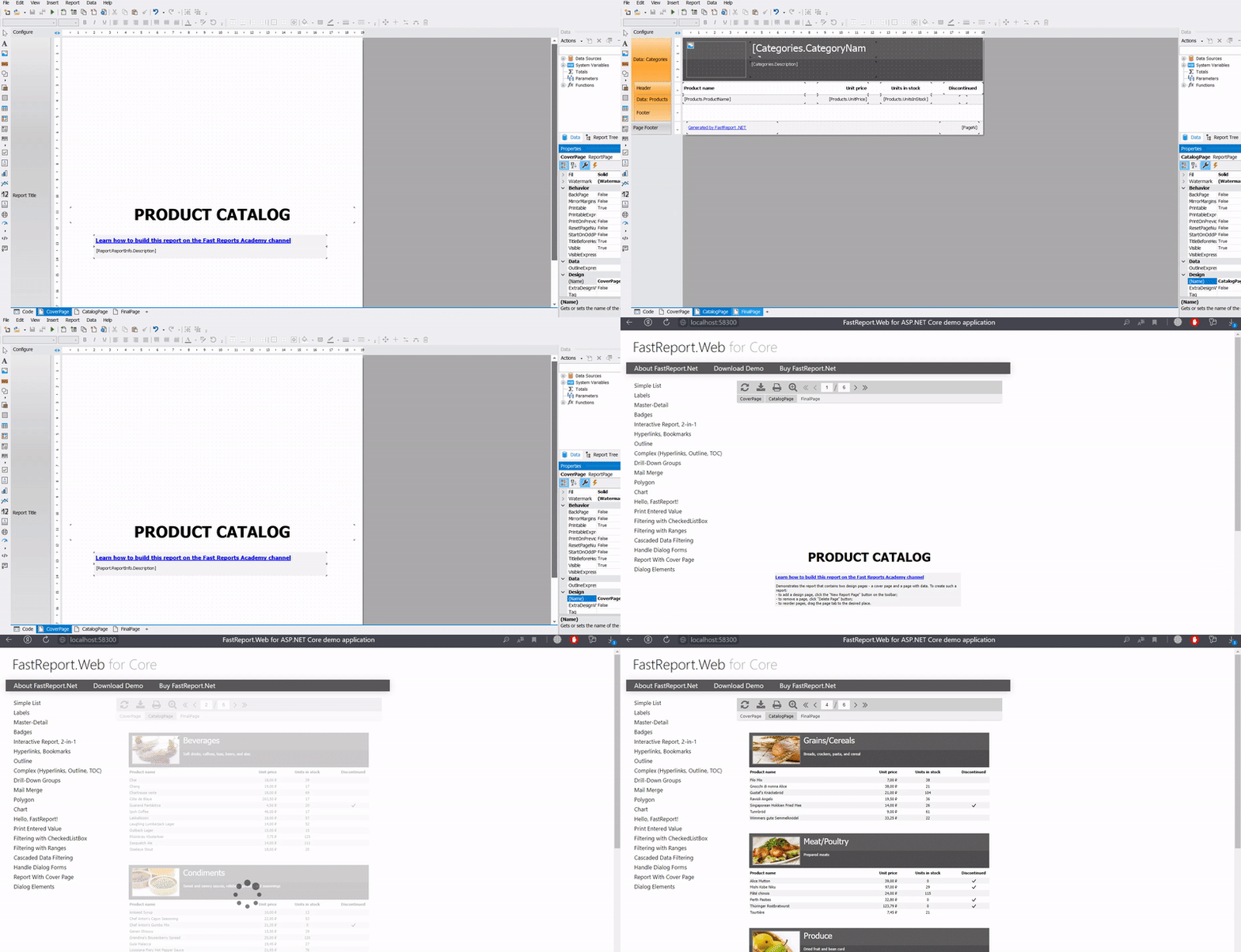
Added the ability to open different ReportPage pages in different WebReport tabs. To activate this feature, you need to enable the webReport.SplitReportPagesInTabs option.
Static Styles in WebReport
To be able to override the standard styles of the toolbar, outline and other elements for your own customization, static class names have been added. These include: fr-toolbar, fr-toolbar-item, fr-toolbar-narrow, fr-toolbar-dropdown-content, fr-toolbar-zoom-selected, fr-toolbar-pointer, fr-toolbar-notbutton, fr-toolbar-slash.
Complete list of changes
[Engine]
+ added a new AdvMatrixObject;
+ added GS1 DataBar barcodes: Limited, Omnidirectional, Stacked and Stacked Omnidirectional;
+ added new properties: Config.CompilerSetting.ExceptionBehaviour and Config.CompilerSetting.Placeholder. These properties give the ability to customize the behavior when exceptions are thrown with incorrect names of database tables and fields;
+ added translation of RichObject inside TableCell;
* reworked translation of RichObject into report objects;
– fixed ShiftMode of translated RTF object;
– fixed a bug with two parameters with the same name in report leading to System.ArgumentException;
– fixed a bug with subreport containing multicolumn Databand;
– fixed a bug with wrong band height calculation;
– fixed a bug with displaying of hyperlinks when converting RTF to report objects;
– fixed translation of RichObject if it set from a report script;
– fixed a bug with private fonts added to Config.PrivateFontCollection;
[.NET Core]
+ added support for .NET 6;
– fixed incorrect search for Bold-Italic fonts;
[Designer]
+ added verification of entered data in editing window of the QR code of SberBank;
– fixed a bug with line break in text object editor;
– fixed a bug when converting rdl reports containing matrices inside table cells;
– fixed a bug with guide lines in the designer;
– fixed a bug with Report tree window;
– fixed a bug leading to System.NullReferenceException and crash of the designer during its launch when the Auto Guides option is enabled;
[Preview]
– fixed a bug with shifting the position of objects when switching the view of bands while editing a prepared page;
[Exports]
+ implemented export of watermark to Word;
+ implemented export of watermark to RTF;
+ added “Don’t rotate landscape pages when printing” option in export to HTML;
+ added the ability to change the name of the attached file when sending by Email;
+ add zooming of SVG images in export matrix;
+ added the ability to export a property that determines the size and position of the image when exporting to Excel 2007;
+ implemented ability to hide or show gridlines when exporting to Excel 97;
+ implemented export of groups on separate sheets to Excel;
+ implemented export of transparency level watermark images to Word;
+ implemented export image size of watermark to RTF;
– fixed a bug leading to System.NullReferenceException when exporting to text, tables with rows count less then one;
– fixed incorrect left padding of tables in export to Word;
– fixed a bug with Wingdings font in HTML tags when exporting to HTML;
– fixed a bug with export Wingdings and Webdings fonts to HTML;
– fixed a bug with width of frame in export to PowerPoint;
– fixed a bug with exporting objects with transparent fill to RTF;
– fixed a bug with exporting objects with transparent fill to Word;
– fixed a bug leading to System.OutOfMemoryException when exporting to PDF;
– fixed incorrect line break display when exporting to HTML;
– fix out of memory when export to PDF;
– fixed bugs in export to PDF in non-Windows systems;
– fixed a bug with exporting tables with more than 63 columns to Word 2007;
– fixed a bug leading to a memory leak and System.OutOfMemoryException in PDF-export when the “Text in curves” option is enabled;
– fixed a bug with line break in HTML-export;
[WebReport]
– fixed a bug with new line character when using Wingdings font;
[WebReport Core / Blazor Server]
+ added the ability to configure the properties of exporting a report from WebReport. When the webReport.Toolbar.Exports.EnableSettings property is activated, the settings icon will appear next to the required export button;
+ added property webReport.SplitReportPagesInTabs, which allows you to split different ReportPage-s in different tabs of WebReport;
+ added static class names for the ability to override the standard styles of toolbar, outline and other elements;
– fixed updating WebReport when entering a value from the keyboard in the DateTimePicker field;
– fixed the width of tabs with non-standard sizes of the report page;
[Demos]
+ added demo of using WebReport Core for .NET 5;
+ added demo of using WebReport Core for Angular;
+ added demo of using WebReport Blazor for Blazor Server;

LOGON is a pan-asian company operating in China, Hong Kong (HK), India, Singapore, Malaysia, Indonesia, Vietnam, Philippines and Thailand. LOGON has local dedicated trained product specialists in Hong Kong, Guangzhou, Kuala Lumpur, Mumbai and Bangalore. LOGON acts both as value added reseller and sole distributor for award winning software solutions. Customers can buy new licenses, purchase upgrades and renewals from any of our local offices. Contact us for first line support during evaluations, PoCs. We offer best practices consulting services and classroom & online training. Check our site for latest offers, special discounts, bundle deals, etc..
Comments are closed
Read Next:


