
Navigation
  • SEARCH HERE
  • SOLUTIONS
    • Information Security Solutions
      • Enterprise Application Security Solutions in Asia
      • Network & Infrastructure Security Solutions
      • Zero Trust Security
      • Security Information and Event Management
      • Remote Monitoring & Management (RMM)
      • File Integrity Management
      • Systems Administration Tools
      • Data Loss Prevention
      • Data / Password Recovery
      • IT Management Solution Offering | Distributor in Asia
      • Identity and Access Management Solution Offering | Distributor in Asia
      • Employee Activity Monitoring (EAM)
      • Digital Forensic Investigation
    • Software Development Solutions
      • Integrated Development Environments
      • Development Components
        • UI Tools
        • Networking Components
        • Office Components
        • Barcode Components
        • Communication Components
      • Imaging Solutions
      • Software Localization
      • Release Automation & Management
      • eLearning Authoring Solutions
      • Charting Solutions
      • PDF Solutions
      • Reporting Solutions
      • Testing & QA
      • Text Retrieval / Enterprise Search
      • Database
  • Services
    • Live Solution Walkthroughs
    • Implementation Services
    • Best Practices Consulting
    • Pre-Sales and Post-Sales Services
  • What's New
    • Our Event
    • Our Blogs
    • Special Offers
  • About
    • About LOGON Software Asia
    • Our Partnership
  • Publishers - Join our network
  • Resellers - Expand your portfolio
  • Procurement Managers
Site logo
  • Solutions
    • Information Security Solutions
      • Identity and Access Management
        • Privileged Access Management (PAM)
        • Multi-Factor Authentication (MFA)
        • Identification Verification (IV)
        • Self-Service Password Reset (SSPR)
      • Network & Infrastructure Security
        • DDoS Mitigation and Protection
        • Digital Forensic Investigation
        • Malware Detection & Analysis
        • Network Monitoring Software
        • Email Security
        • Log Monitoring
      • Endpoint & Device Security
        • Patch Management
        • Remote Monitoring & Management (RMM)
        • Employee Activity Monitoring (EAM)
        • Mobile Device Management (MDM)
      • IT Management
        • IT Service Management
        • IT Asset Management
        • Software Asset Management
        • Hardware Asset Management
        • Software License Management
        • Systems Administration Tools
      • Application Security
        • Development Security | Shift Left AppSec | SAST, SCA, IAST
        • Runtime Protection Solutions | DAST, RASP, WAF, Container Security
        • Strategic Management Solutions | ASPM, MAST, VAPT
      • Data Security
        • Data / Password Recovery
        • File Integrity Management
        • Data Loss Prevention
      • Cloud Security
        • Cloud Security Posture Management
        • Cloud Work Protection
      • External Attack Surface Management
        • Cyber Threat Intelligence
        • Third Party Risk Management
      • Security Operations & Incident Management
        • Security Information and Event Management
        • Security Orchestration, Automation and Response (SOAR)
      • Zero Trust Security
    • Software Development Solutions
      • Integrated Development Environments
      • Imaging Solutions
      • UI Tools
      • Charting Solutions
      • Developer Tools
      • Database
      • Networking Components
      • Office Components
      • Barcode Components
      • Release Automation & Management
      • Software Localization
      • Communication Components
      • Automated Testing
      • eLearning Authoring Solutions
      • Reporting Solutions
      • Text Retrieval / Enterprise Search
      • Testing & QA
  • Services
        • Live Walkthrough Sessions

          Experience the full feature of our key solutions through live platform

          View All Sessions >
        • Implementation Services
        • Pre-Sales and Post-Sales Services
        • Best Practices Consulting
  • Partners
    • Our Partners
    • Partner with LOGON Today!
      • Vendors - Join Our Network
      • Resellers - Expand Your Portfolio
      • Procurement Managers
  • Resources
        • ABOUT US

        • About Us
        • Our Locations
        • Careers@LOGON - We are hiring !
        • DISCOVER

        • Our BlogsNEW BLOGS
        • Our EventsJOIN UPCOMING EVENTS
        • LOGON to CyberSecurity PodcastNEW EPISODES
        • GET HELP

        • Contact Us
        • Help Desk
        • Request a Demo
        • Request a Quote
        • COMPLIANCE

        • 🇭🇰 Hong Kong PDPO
        • 🇮🇳 India DPDP Act
        • 🇸🇬 Singapore PDPA
        • 🇹🇭 Thailand PDPA
  • More results...

View large
Blog, Elcomsoft Blog

Breaking Windows Passwords: LM, NTLM, DCC and Windows Hello PIN Compared | Elcomsoft

Breaking Windows Passwords: LM, NTLM, DCC and Windows Hello PIN Compared

This article was originally published by LOGON’s partner Elcomsoft. Click here to view the original article.

Modern versions of Windows have many different types of accounts. Local Windows accounts, Microsoft accounts, and domain accounts feature different types of protection. There is also Windows Hello with PIN codes, which are protected differently from everything else. How secure are these types of passwords, and how can you break them? Read along to find out!


The classic passwords

When attacking Windows account passwords, one has to deal with several different ways the password hashes are produced, protected, and stored.

LM hashes are the oldest types of passwords used since the original version of Windows was released. Microsoft discontinued the use of LM hashes quite some time ago in Windows Vista/Server 2008, but you may still encounter one of those in an older system. LM hashes are stored locally in the SAM database, or the NTDS database on the Domain Controller.

NTLM hashes are the modern replacement of LM. Microsoft still uses the NTLM mechanism to store passwords in modern versions of Windows. These passwords are also stored in the SAM database, or in the NTDS database on the domain controller. Surprisingly, NTLM hashes are even faster to break than LM due to the way the algorithm is implemented.

NTLM hashes protect local Windows accounts as well as the newer types of accounts introduced in Windows 8: the Microsoft Account sign-in. Windows caches the password hash and stores it locally on the computer. This allows users to log in to their computer while using it offline. On another hand, this also allows extracting the cached hash file and running an offline attack to recover the original password. The hashed Microsoft Account passwords are stored locally in the SAM database along with the rest of NTLM hashes. Technically, the locally cached Microsoft Accounts passwords are protected with the same NTLM mechanism as other types of cached credentials, which makes them just as easy and as fast to attack as local Windows passwords.

NTLM hashes are poorly salted. Microsoft uses cryptographic salt to protect LM and NTLM password hashes. However, the same salt is used to protect all LM and all NTLM passwords, which allows attacking all user accounts that present on a certain computer simultaneously. This only changed in Windows Hello PINs.

Windows also has DCC, which stands for Domain Cached Credentials. These are locally stored, cached password hashes that are used to log in to the domain. Domain Cached Credentials are protected differently compared to all other types of credentials, and feature a significantly stronger protection compared to LM and NTLM passwords.


Microsoft Account passwords

In Windows 8, Microsoft introduced a different authentication system, Windows Hello. Users of Windows 8, 10 and Windows 11 are encouraged to set up a PIN and use it instead of their account password. Microsoft claims that the PIN is more secure than a traditional password, which is generally true only if the user’s computer is equipped with a configured TPM module. Without a TPM, the PIN becomes just another password – and a very weak one if the user follows Microsoft’s defaults and sets up a 4-digit or 6-digit PIN. If, however, the user configures an alphanumerical PIN (which, basically, is yet another name for the password), the situation changes.


Windows Hello PIN codes

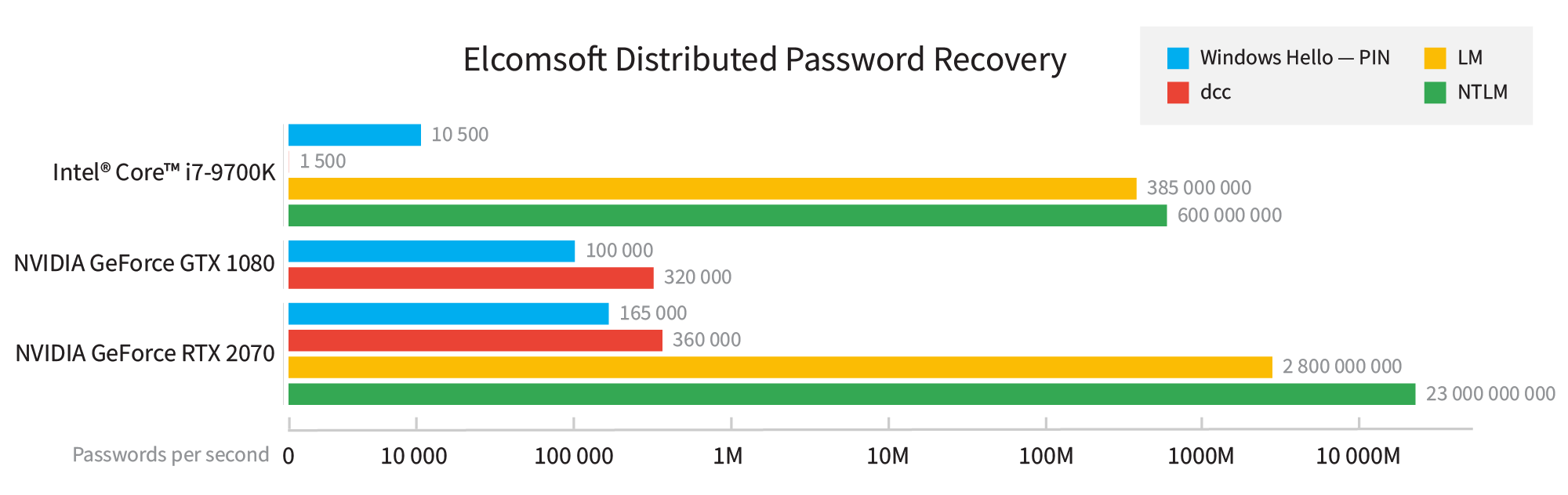
Attacking Windows Hello PIN codes is significantly slower compared to NTLM attacks. According to the table below, the attack on an alphanumerical Windows Hello PIN with Elcomsoft Distributed Password Recovery can be some 50,000 to about 150,000 times slower compared to the attack on the NTLM hash. In addition, Windows Hello PINs are individually salted, which means that all PIN-protected accounts must be attacked in sequence.
What do the numbers mean?

What does a brute force rate of 23 billion passwords per second (for NTLM hashes) really mean? Let us take an 8-character password consisting of a random set of numbers and Latin letters in both cases (95^8 possible combinations). At a rate of 32 billion passwords per second, you will need about 80 hours to break that password. Recovering a 7-digit alphanumerical password will take less than an hour, while shorter or less complex passwords can be cracked in negligible time. A 9-character password, however, will take almost a year to break; accordingly, cracking 9-character alphanumeric passwords will require the use of high-quality dictionaries and smart attacks.

What about the PIN codes, which have a 165 thousand passwords per second rate? At this speed, you’ll need some 1300 years to break the common 8-digit password, or about 13 years for a 7-character password, or about 50 days to break a 6-character alphanumerical password. This means that you’ll already require a dictionary and smart attacks to break even a relatively short 6-character password.


Conclusion

We compared the different types of cached account credentials in Windows. Of those compared, Windows Hello PINs are among the most secure, but only if the user configures a long alphanumerical PIN. Without a TPM, all-digit PIN codes are insecure and can be broken in minutes.


EDPR
EFDD

Elcomsoft Distributed Password Recovery

Build high-performance clusters for breaking passwords faster. Elcomsoft Distributed Password Recovery offers zero-overhead scalability and supports GPU acceleration for faster recovery. Serving forensic experts and government agencies, data recovery services and corporations, Elcomsoft Distributed Password Recovery is here to break the most complex passwords and strong encryption keys within realistic timeframes.

Solution Highlight

Elcomsoft Forensic Disk Decryptor

Elcomsoft Forensic Disk Decryptor offers forensic specialists an easy way to obtain complete real-time access to information stored in popular crypto containers. Supporting desktop and portable versions of BitLocker, FileVault 2, PGP Disk, TrueCrypt and VeraCrypt protection, the tool can decrypt all files and folders stored in crypto containers or mount encrypted volumes as new drive letters for instant, real-time access.

Solution Highlight
Contact Us Today

FOLLOW US ON

  • LinkedIn
  • Facebook
  • Instagram
  • Twitter
  • YouTube
Read Next:
Application Security BlogArtificial IntelligenceBlogLOGON Blog
AI-Augmented Penetration Testing: Meeting the Scale Challenge
Application Security BlogArtificial IntelligenceBlogIT Management BlogLOGON Blog
The First Autonomous AI Cyber Attack is Here: Is Your Enterprise Ready?
Application Security BlogBlogLOGON Blog
Shift Left, Verify Right: The Blueprint for Modern Application Security Across Asia

Privacy Policy Company Overview

COMPANY

Our Location Career with LOGON Our Partners

SERVICES

Training Services Implementation Services Pre-Sales and Post-Sales Services Best Practices Consulting

GET IN TOUCH

Phone:
Hong Kong: +852 2512 8491
India: +91 70220 22744 / +91 63668 26133
Email: [email protected] ©2025 LOGON International Ltd. All rights reserved
logon logo WHITE

Search engine

Use this form to find things you need on this site

More results...

Fill in the form below
  • This field is for validation purposes and should be left unchanged.
  • This field is hidden when viewing the form
  • This field is hidden when viewing the form

Watch On-demand Webinar

  • This field is for validation purposes and should be left unchanged.

Get Your Free UserLock Trial

  • This field is for validation purposes and should be left unchanged.

Download Your Free Trial 10-Day Trial Today

  • Downloading and evaluating Smart Package Studio is quick and easy
  • Includes a short introductory guide that suggests smart features to try
  • Access the full functionality of Smart Package Studio during the trial
  • This field is for validation purposes and should be left unchanged.

Request for Priority Support with our support team

  • This field is for validation purposes and should be left unchanged.
  • Drop files here or
    Max. file size: 30 MB.

    Get Free Assessment of your Web Asset

    Request a free non-intrusive security assessment of your website. Get a report with an overview of client-side security risks.

    • This field is for validation purposes and should be left unchanged.
    • This field is hidden when viewing the form

    Recommend a Topic

    • This field is for validation purposes and should be left unchanged.

    Partner with Us on the next episode

    • This field is for validation purposes and should be left unchanged.

    Watch On-demand Webinar

    • This field is for validation purposes and should be left unchanged.
    Start PreCrime Network for Free

    Oops! We could not locate your form.

    Book a Free Demo Today

    Get Your Free Trial

    Oops! We could not locate your form.

    Get Your Free Trial
    • This field is for validation purposes and should be left unchanged.
    • This field is hidden when viewing the form
    • This field is hidden when viewing the form
    Request for Training Quote

    Oops! We could not locate your form.

    Request for Training Quote

    Oops! We could not locate your form.

    Request for Training Quote

    Oops! We could not locate your form.

    Request for Training Quote
    • This field is for validation purposes and should be left unchanged.
    • Please enter a number from 1 to 20.
    • This field is hidden when viewing the form
    Request for Training Quote
    • This field is for validation purposes and should be left unchanged.
    • Please enter a number from 1 to 20.
    • This field is hidden when viewing the form
    Request for Training Quote
    • Please enter a number from 1 to 20.
    • DD slash MM slash YYYY
    Request for Training Quote
    • This field is for validation purposes and should be left unchanged.
    • Please enter a number from 1 to 20.
    • DD slash MM slash YYYY
    Request for Training Quote
    • This field is for validation purposes and should be left unchanged.
    • Please enter a number from 1 to 20.
    • DD slash MM slash YYYY
    Request for Training Quote
    • This field is for validation purposes and should be left unchanged.
    • Please enter a number from 1 to 20.
    • This field is hidden when viewing the form